
Choose a model #
On this page
Switch models at any time inside the agent:
/model              pick from a list
/model gpt-4.1      switch directly
/model auto         let the agent choose for each message
Which models appear depends on what you have configured: the ones your Copilot plan allows, the ones your
Anthropic key can call, and whatever your local servers have loaded. The agent also shows how much of the
model's context is used, in the status bar. /context shows the figures.
In plain words #
- What it is. Which model answers your messages.
/modelin the agent shows the list and switches. - Let it choose.
/model autopicks a heavier or lighter model for each message from the same provider, and says what it picked and why. - On the setup page. Models & routing, Auto mode, chooses what
automeans for every tool that uses the proxy. Without a choice it follows your provider's own ranking.
Automatic choice #
/model auto chooses a model for each message from your current provider's own ranking of its models, and
tells you what it chose and why. For example, the status bar reads gpt-4.1 (auto: heavy) and the first
message prints a line such as model: auto → gpt-4.1 (heavy; no powerful model on this account; used
versatile).
It works inside one provider at a time and never switches between them. If you are on a Copilot model,
each message picks among Copilot's models. If you are on an Ollama model, it stays in Ollama. Moving between
a cloud model and a local one changes cost, privacy and capability, so that stays your decision: use
/model <name>.
- Providers with a ranking. GitHub Copilot labels each model powerful, versatile or lightweight, and auto uses those labels. An account with no powerful model (Copilot's free plan) sends heavy work to the best model it has.
- Providers without one. Ollama, LM Studio, oMLX and Apple's on-device model publish no ranking, so there
is nothing to choose between and auto keeps your model. To rank a local provider's models yourself, add
category: powerful,versatileorlightweightto each model inconfig.yaml. - Choose it yourself.
harness.auto_model_mappins the model used for heavy, medium and light work:harness: auto_model_map: heavy: gpt-5-mini medium: gpt-4.1 light: claude-haiku-4.5It is one map, and every model in it must belong to the provider you are currently on; an entry for another provider is ignored with a notice.
Auto keeps your own model when it fits, avoids models known to decline long tasks, and remembers models that
decline. By default it does not pick models whose names match *-codex* for you (they are built for a different
tool and often refuse long autonomous work here); harness.auto_avoid in config.yaml changes that list, and
auto_avoid: [] turns it off. A model you choose yourself, or name in auto_model_map, is always allowed.
Auto keeps your own model when it can serve the message: it only moves when the model you are on is the wrong weight for the work, for example a lightweight model asked to plan something large. A model that declines a task it can do is skipped for the rest of the session, and you are told when auto switches away from it.
maple-harness doctor shows what auto would use on your account.
Which model a weight uses. Within a weight, auto prefers the models you name first. When the provider's model list says more about its models (GitHub Copilot can say which are previews, which is its own default, and how each is billed), auto then prefers a model that is not a preview, then the provider's own default, then the one billed lower, then the provider's own listing order. Without that information it chooses as before: the model with the largest context window first. Signing in again, or refreshing the model list, records this information; the proxy's Auto mode card shows which model each weight will use before any request is sent.
Where a new message starts. A new message, before any work is under way, starts on the heavy model: a hard task
on a weak model costs the work. To start it on the medium model instead, set harness.auto_first_weight: medium
(and auto_first_weight: medium in the proxy's config.yaml for its own auto). Planning, and questions that ask
for judgement (why, design, review, debug and the like), stay heavy either way. It is off by default; whether it
saves anything depends on your tasks, so compare with maple-harness bench before relying on it.
Auto in other tools, through the proxy #
The proxy has the same idea built in, for every tool that talks to it: ask for the model auto and the proxy
chooses a model for each request, or ask for auto-heavy, auto-medium or auto-light to fix the weight. With
nothing configured it uses the first provider in config.yaml that ranks its models, and never mixes providers.
- Set it up on the setup page's Auto mode card: for each weight, a model (Copilot Auto included) and its fallbacks, saved with one click and used from the next request. See Set up auto mode.
- See what it chose: the
X-Maple-RouterandX-Maple-Served-Byresponse headers, therequestedandmodelcolumns of the usage log, and the proxy's log. See See what auto chose.
Inside Maple Harness, typing /model auto is still the agent's own choice described above. The /model list also
shows the proxy's names as auto (Maple), auto-heavy (Maple), auto-medium (Maple) and auto-light (Maple),
each with a description that starts "Maple auto" (see the picture under Copilot Auto); picking one
of them from the list sends every request to the proxy's auto mode under that name, and the status bar then reads,
for example, model: auto (Maple). To have the agent judge each message and the proxy pick the
model, set harness.auto_model_resolution: proxy.
harness.default_model: auto in config.yaml is the same as picking auto (Maple): the proxy picks the model for
each request, and auto_model_resolution plays no part. The first message of a session starts on the heavy model
unless it reads as a short side job (a summary, a title); later messages, once work is under way, go to the medium
model unless they ask for planning, diagnosing or deciding. Every request of one message stays on the model the
message started on (auto_first_weight: medium starts a new message on the medium model instead). To choose which
model each weight uses, use the proxy's Auto mode card.
Copilot Auto #
GitHub Copilot has an automatic mode of its own, in which Copilot picks the model for each request. The proxy
lists it as a model of each Copilot account, named after the account, for example github-copilot/auto:
/model github-copilot/autoIn the /model list, and on the status bar once chosen, it reads Copilot Auto (github-copilot), with the account's
nickname in brackets when it has one:
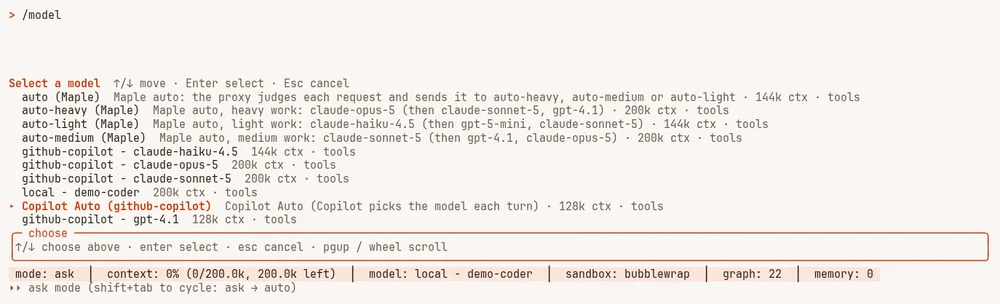
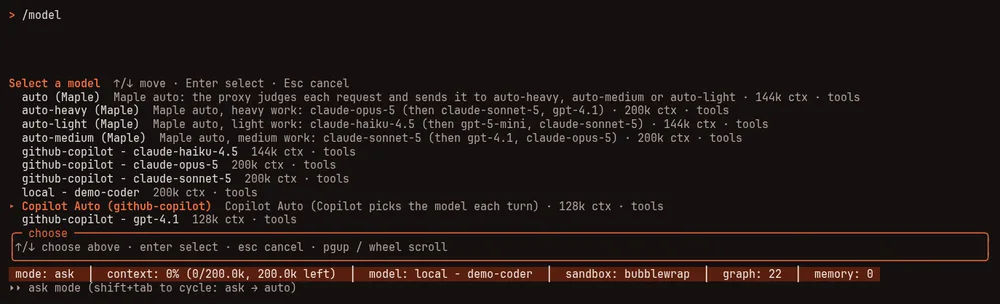
/model list with Copilot Auto selected. The rows marked "(Maple)" at the top are the proxy's own auto names. A demo setup with a stand-in Copilot service.It is a different thing from /model auto:
/model auto | Copilot Auto | |
|---|---|---|
| Who chooses | Maple Harness, from your provider's own ranking and your settings | Copilot, on GitHub's side |
| Works with | any provider with a ranking, or models you ranked yourself | GitHub Copilot only |
| How to ask for it | /model auto | /model github-copilot/auto, or that name from any tool through the proxy |
- It is listed only when your account offers it. The proxy asks Copilot whether your account can use automatic
selection; if not, it is not in the list. To hide it anyway, set
copilot_auto: offon the provider (see Providers and models). - The plain name
autois not Copilot's.autois the proxy's own auto mode (or your model alias calledauto, which keeps meaning what you set); Copilot's Auto is only ever the name with the account in front. - Choose it as the model, or as the model for a weight. Pick it in
/model(or ask forgithub-copilot/autofrom any tool), or choosegithub-copilot/auto (Copilot Auto: Copilot picks)for a weight on the setup page's Auto mode card, so that a request forautojudged to be that weight lets Copilot pick. See Set up auto mode. - See what Copilot picked. Every answer names the model that wrote it: the proxy's
X-Maple-Served-Byresponse header and themodelcolumn of the usage log show the chosen model, therequestedcolumn showsgithub-copilot/auto, andX-Maple-Routersays which models Copilot offered and whether it chose one for this request or the account's default model was used. With the proxy's log on, each request's line reads, for example,github-copilot/auto→claude-sonnet-5@github-copilot. See See what auto chose. - Its limits are those of the smallest model Copilot may choose for your account, so a long conversation is kept to a size every one of them can take.
- It relies on a part of Copilot that GitHub does not document, the same one GitHub's own editors use. It may change without notice. If Copilot does not say which model to use for a request, the proxy uses the model your account's automatic selection names by default, so the request still gets an answer.
Copilot Fusion #
In plain words. Copilot Fusion is GitHub Copilot's newer automatic mode. Instead of you picking a model, Copilot plans each task: for most tasks one model does the work; for harder ones a model does the work, a second look (a review) checks the result, and a stronger model takes over when the review is not satisfied. You pick how hard Copilot should try (Standard, High or Max) and Maple carries out Copilot's plan, so it works in Maple Harness and in every tool that uses the proxy. Every model that worked on a task, and what it cost, is shown.
The details. Each Copilot account lists three more models, when the account has them:
| Model | What it is |
|---|---|
github-copilot/fusion | Copilot Fusion Standard: the same as Copilot Auto (github-copilot/auto keeps working). Copilot picks one model for each task. |
github-copilot/fusion-high | Copilot Fusion High: Copilot plans each task, and picks the models and how hard each should think. |
github-copilot/fusion-max | Copilot Fusion Max: as High, with the most capable models. |
In the /model list they read Copilot Fusion Standard (github-copilot), Copilot Fusion High (github-copilot)
and Copilot Fusion Max (github-copilot). A tier your account does not have is listed with GitHub's reason (for
example, a model it needs is not enabled for you), and asking for it says the same.
How a task is worked, as Copilot plans it:
- Single: one model does the whole task.
- Cascade: one model does the task; when it gives its final answer, a review scores the answer from 1 to 5 against what you asked, using the commands and results of the task as evidence, and your files when you let it (see below). A score of 3 or more is accepted and you get the answer. Below that, a stronger model takes over from where things stand, with the review's reasons; if its answer is not accepted either, a third model repairs the work; after that, the last answer is passed on, marked not accepted.
- Critique: one model drafts the answer, a model from another family critiques it, and the first revises once.
The review reads your files through your own tool, as Copilot CLI's review does. It is on by default; untick
Let the review read files when editing the GitHub Copilot provider on the setup page, or set
fusion_review_reads: off on the sign-in, to keep the review to the task's commands and results:
providers:
  - id: github-copilot
    type: github-copilot
    fusion_review_reads: off   # on (the default): the review may read files through your tool
With it on and read-only tools in your tool (Maple Harness's read_file and grep; Claude Code's Read, Grep,
Glob and LS; OpenCode's grep and glob), the review may use them, at most 12 calls a review, to open the files the
answer is about and check what it claims. Its calls come to your tool like any other step, so your tool's permission
rules and the folders it hides apply as usual. They are the review's, not the agent's: the models that do the task
are never sent them. Maple Harness marks each one · Copilot Fusion review (and asks about it under that name), and
lets a review only read, only inside the project, whatever the proxy asks. A tool that offers no read-only tool, or
a sign-in with the setting off, gets the review as in 2.4.
Streaming. A step whose answer nothing will review streams as it comes: every step of a Single turn, and any step that calls a tool. Only a final answer a review will score is held until the review has scored it, since what has been shown cannot be taken back.
What you see:
- In Maple Harness, the status bar shows the turn in progress (for example
Copilot Fusion High · cascade ·
escalation
), and when the turn ends, one line tells its story: which model worked on it, each review's score, who took over and which answer was used, and when one of Maple Harness's own checks asked for another round ("reopened by Maple Harness's build check"). Then its receipt: what the work, the reviews and any answers not used were billed (as Copilot stated), about how many premium requests the turn took (estimated: the calls Copilot was told you started, which is what it counts) and which files the review read. For example: Billed 5.16 AI units for the work, 2.67 for reviews (as Copilot stated); about 4 premium request(s) (estimated). The review read index.html (×2), tests/dungeon.test.mjs. - A budget per turn, if you want one:
harness.fusion_turn_budget: 10finishes any Copilot Fusion High or Max turn that passes 10 AI units on Copilot Fusion Standard, and says so. Off by default. - On the setup page, the Savings card sums up each tier (how its turns ended, the reviews' share of what it was billed, measured, and its premium requests, estimated) and lists every call of today's Fusion turns by tier, part of the turn (solver, judge, escalation, repair, critic, revision) and model, with their AI units, and how the turns ended, with each turn's pattern.
- In the usage log, every call is a line of its own, the reviews and the answers not used included, with the
turn's id, its tier, pattern and Copilot's rule, the call's part in the turn, the review's score and how the turn
ended (
fusion_id,fusion_tier,fusion_pattern,fusion_rule,fusion_phase,fusion_verdict,fusion_outcome; see the usage record schema). Group by them withmaple-proxy usage query --group-by fusion_phase,model.
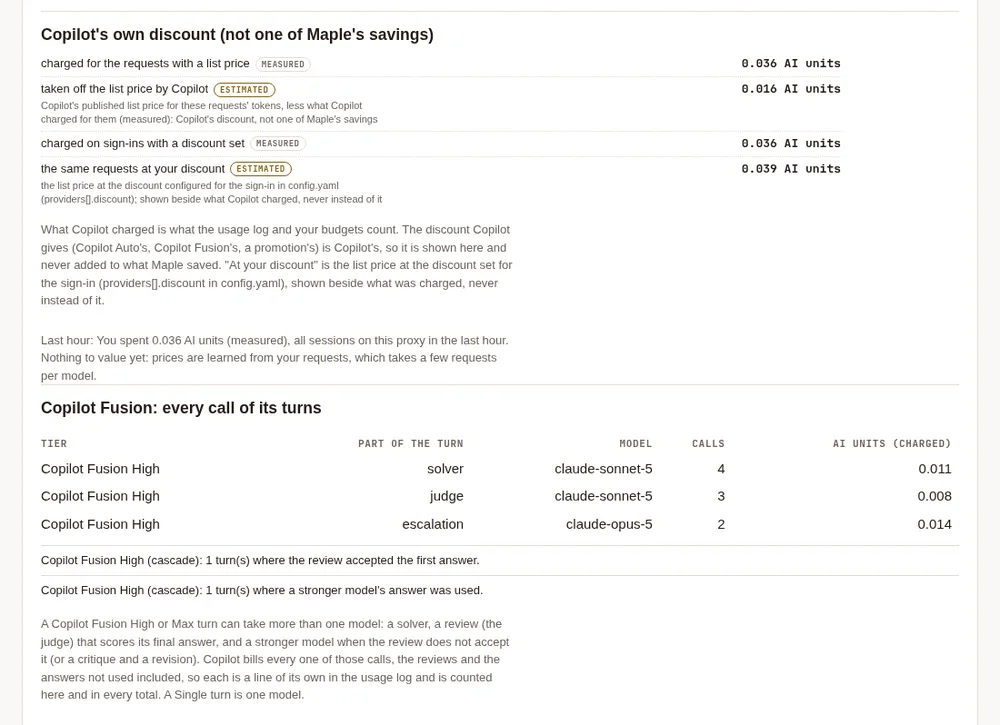
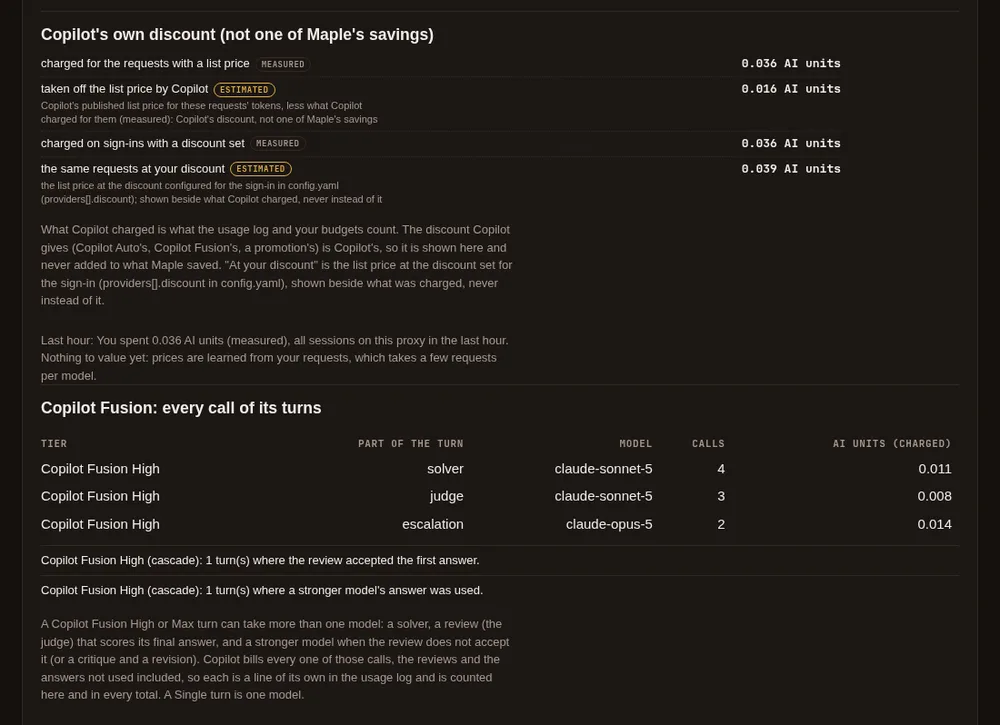
- In the response headers,
X-Maple-Fusiongives each request's place in its turn, andX-Maple-Served-Bythe model that answered it.
What it costs:
- Every call is billed by GitHub at that model's own rate, the reviews and the answers not used included, and each counts against your budgets like any other request. High and Max can use several models for one task, so a task can cost more than with one model. Copilot counts a review as a request of yours, as it does in Copilot's own apps.
- Copilot's discount applies, and is read from what Copilot charged (see Discounts).
- Things to know: with
fusion_review_readsoff, or a tool with no read-only tools, a review sees the task's commands and their results, not your files. A model that took over continues from the files as they are; nothing a draft changed is undone (Copilot's own apps work the same way: the model that takes over is given the review's reasons and fixes what needs fixing). Fusion's limits are those of the smallest model it may use. Like Copilot Auto, it relies on a part of Copilot that GitHub does not document, which may change without notice. If Copilot cannot plan a task (it refuses, or answers in a way Maple cannot carry out), the task goes through Copilot Auto instead of failing and is billed as Copilot Auto. It says so everywhere: Maple Harness's story of the turn ("Copilot could not plan it, so Copilot Auto answered"), the usage log (fusion_phaseandfusion_outcomearefallback), the setup page, andX-Maple-Router("in place of Copilot Fusion High, because …"). Maple asks for a plan again after ten minutes. - Fallbacks, budgets and the "out of quota, tried last" rule treat it as one model, whichever model Copilot chose. What a request costs is recorded as Copilot reports it, like any other model; nothing here says it costs more or less than choosing a model yourself.
A default model #
Set the model the agent starts with in config.yaml:
harness:
  default_model: gpt-4.1
  auto_model: false      # true starts every session in automatic mode
If the configured model is not one your proxy serves, the agent starts on the first usable model it does serve and prints a one-line note listing the real names.
Effort and thinking #
/effort             list the levels this model accepts
/thinking off       spend no reasoning tokens
/plan               read-only mode: the answer is a plan
Related: every model setting is in Harness settings; to fall back to another model or account when one cannot answer, see Fallbacks; for what a model costs you, see See and reduce what a task costs.