
Share Maple with a team: hubs, people and fallbacks #
On this page
This guide is for running Maple for more than one person: a small team sharing one proxy, a company with a hub per team, or one person whose laptop should fall back to a shared hub when their own account runs out. It walks through each setup with the configuration to type, what you see afterwards, and where to look when something is not what you expected.
The reference pages hold every key and every flag: Teams for people, teams, tokens, budgets and accounts on one proxy, and Chain proxies into hubs for one proxy using another. This page ties them together. Not sure which setup you need? Which setup do I need? compares them all, from one laptop to several replicas, with what each guarantees and what can go wrong.
In plain words #
- One proxy, several people: open the proxy to your network, give each person a token, and see who used what. The setup page's People & teams tab walks you through it.
- Your laptop and a team hub: your own proxy joins the hub, by signing in with your company account or with a token from the hub's admin. Maple Harness keeps talking to your own proxy, as always, and reaches the hub's models through it.
- Several proxies working as one: a laptop's proxy, a team hub and a company hub can be chained. The upper one hands its people down and receives everyone's usage. The setup page's Hubs & chaining tab does it in two steps: the hub's admin makes a chain token, and you paste it into Connect this proxy to a parent hub. Its hub map then shows every proxy and whether it is still in touch.
- A fallback across machines: your own account first and the team's when it runs out, or the other way round.
The rest of this page is the technical view: what to type, what you see, and why.
Who this is for, and who can skip it #
If you use Maple on your own machine, you need none of this. Install it, sign in and work, as before. Nothing
on this page is on until you add it to config.yaml: a proxy with no people:, no teams: and no other Maple
proxy as a provider behaves exactly as it always has, its setup page shows no People or Chained proxies cards, and
nothing new appears in your terminal.
Read on if:
- several people should use one proxy, each with their own token, and you want to see who used what, give each person or team their own accounts, or cap what each can spend;
- you run more than one proxy (a laptop, a team machine, a company machine) and want them to work as one: people set up once, requests passed up to the machine that holds the accounts, and usage reported back up;
- you want a fallback that crosses machines: your own account first and the team's when yours runs out, or the team's first and your own local model when the team's is not available.
The building blocks #
| Word | What it is |
|---|---|
| Proxy | maple-proxy: the program that holds sign-ins and keys and talks to the models. Every Maple install has one, usually listening only on 127.0.0.1 |
| Hub | A proxy that other machines or other proxies use. Nothing extra is installed: a hub is a proxy that listens on a network address and asks every caller for an access token |
| Person | Someone who sends requests, named in people: (such as alice). Every request made with one of their tokens counts as theirs |
| Team | A group of people, named in teams: (such as platform). A team can have accounts, a budget and a model list that its people share |
| Account | One provider sign-in or key on a proxy: a GitHub Copilot account, an Anthropic API key, a model server. Each has an id |
| Token | An access token made on a proxy, given to one person or one other proxy. config.yaml names a person's tokens by their id, never by the token itself |
And two words for chained setups:
| Word | What it is |
|---|---|
| Parent | The hub a proxy passes requests to: a provider of type: maple, named in chain.parent. A parent can have a parent of its own |
| Child | A proxy that uses a parent. It inherits the parent's people and teams, and sends its usage records up to it |
A. One shared proxy for a small team #
One machine runs the proxy with the team's accounts; everyone else connects to it with their own token.
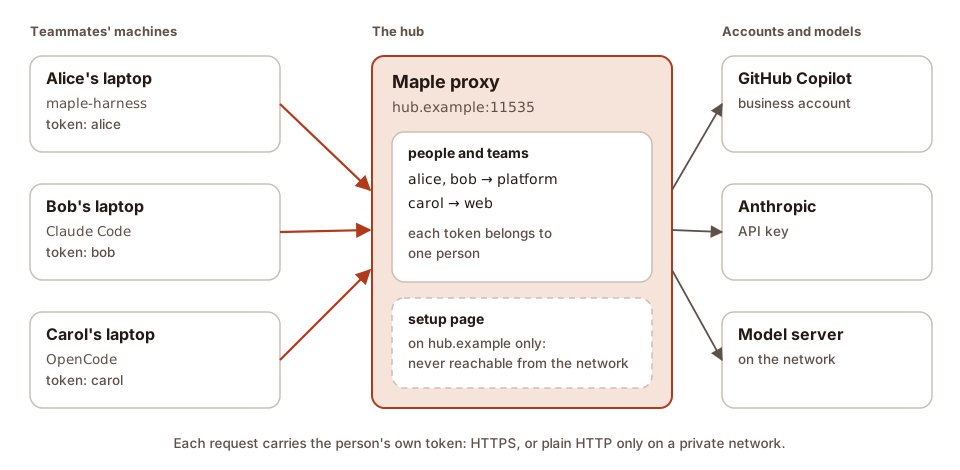
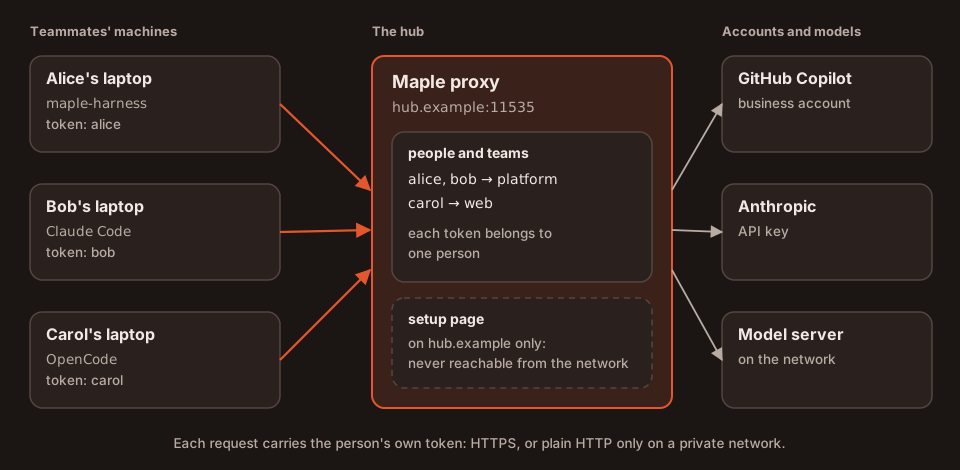
The hub can run as a program on a machine, as below, in a container (Docker), or on a cluster, with several replicas when a restart must not interrupt anyone (Kubernetes).
1. Open the proxy to the network. On the hub machine, in config.yaml:
server:
  openai_compat: 0.0.0.0:11535
  anthropic_compat: 0.0.0.0:11537
  allowed_hosts: [hub.example]      # the name your teammates use to reach this machine
Off this machine every request needs a token with the proxy scope, and the proxy will not start that way until
one exists. List the name your teammates type in allowed_hosts: a request that arrives under another name is
refused with 403. The setup page never listens beyond this machine. Reach the hub over HTTPS (in front of the
proxy, for example a reverse proxy), or over a private network such as Tailscale or a VPN: plain HTTP across a network
others share lets them read the tokens. A hub on the same machine (for a try-out, or a proxy joining a hub that runs
beside it) can be reached over plain HTTP, sign-in included, with nothing to set.
2. Make a token for each person, and say whose it is. A person signs in with an access token tied to them; there
is no other password. Make each token on the setup page (People & teams, the person's Access and tokens,
Make a token: the proxy scope only, tied to them at once), or with maple-proxy token add <label> --person <id>;
a token made under Security & access → Remote access is tied on the People card (Edit → Tie a
token) or by its id. Every click, how to hand a token over, and what each tool does with it are in
How each person signs in.
maple-proxy people add alice --team platform
maple-proxy people add bob --team platform
maple-proxy people add carol --team web
maple-proxy people tie-token alice <token-id>
config.yaml then holds the people with their token ids (never the tokens), and the People card shows each person,
their team, their tokens by label and what they spent. The People card applies a change at once, and so does the
command when the proxy is running on that machine (it says so); otherwise the proxy reads the change when it next starts. Every step is in
Set up a team in four steps.
3. Connect each teammate. A teammate who runs Maple on their own laptop has their own proxy there, and Maple
Harness keeps talking to that proxy: their proxy joins the hub, and every tool that uses it (Maple Harness, Claude
Code, OpenCode) then reaches the hub's models as hub/<model>. Two ways:
- Sign in with their company account, when the hub has single sign-on with developer sign-in
on. No token to hand over: on their proxy's setup page (Hubs & chaining, Sign in with your company
account), with
maple-proxy chain connect --sso <the hub's sign-in address>, or with the Maple Harness shortcutmaple-harness proxy connect --sso <the hub's sign-in address>, which has their local proxy sign in (the harness itself gets no token). See Join your laptop to a team hub. - Paste the token you made for them on their proxy's setup page (Hubs & chaining, Connect this proxy to a parent hub, under Or paste a token from the hub's admin). Test the connection says who the hub counts them as, and the page leaves Use the hub's people and teams here, and send usage up unticked: a person's token uses the hub's models as them, and only a chain token can do more. See Join with a personal token.
Either way the hub counts what their proxy sends as them. Which to choose, and what each guarantees: Which setup do I need?.
Advanced: Maple Harness straight to the hub. Where no proxy of their own can run (a CI job, a container), Maple
Harness can use the hub directly: maple-harness proxy connect <address> asks for the token without showing it,
keeps it in the secret store and writes only a reference into config.yaml. In a demo setup where the hub is
reached by name over plain HTTP, the first try is refused, and the second accepts it:
$ maple-harness proxy connect http://team.example:12835
proxy connect: the proxy at team.example:12835 is on another machine and is reached over plain http, which sends the access token where the network can read it; use https, or a private network such as Tailscale or a VPN and then set harness.proxy.allow_insecure: true if you accept that
$ maple-harness proxy connect --allow-insecure http://team.example:12835
Stored the token in the secret store (file) as maple-proxy-token.
Wrote harness.proxy to /home/demo/bob/.config/maple-harness/config.yaml: url http://team.example:12835, token ${secret:maple-proxy-token}.
Connected: the proxy at http://team.example:12835 accepted the token and serves 2 model(s).
$ maple-harness proxy status
Proxy
proxy:   http://team.example:12835 (run elsewhere)
status:  running, serving 2 model(s)
managed: on its own machine; this harness never starts or stops it
With https:// there is no flag to add. The harness never starts, stops or restarts a proxy on another machine.
Claude Code, OpenCode and other tools use the hub's address and the person's token as their API key: for Claude
Code, ANTHROPIC_BASE_URL=https://hub.example:11537 and the token in ANTHROPIC_API_KEY; for OpenCode or any
OpenAI-compatible tool, https://hub.example:11535/v1 and the token as the key. See
On each teammate's machine.
Each person uses their own token: every request made with one is counted as its person's. A request from the hub
machine itself without a token counts as the person local. You are responsible for following each provider's
terms for the accounts you connect.
Two of them say who may use a hub's account. Grok (xAI): an API key from your organisation's xAI team, for your organisation's own staff; a hub never uses anyone's Grok subscription. The Gemini API: for your own organisation's people only, and on a paid tier, since Google's free tier may use what is sent to improve its products (see Gemini API). Maple cannot check either for you.
B. Who uses which account #
A hub can hold several accounts for the same models, and give them out: one for everyone, one per team, or one for a single person.
default_accounts: [company]          # tried first for everyone
teams:
  - id: platform
    accounts: [platform-account]     # tried first for the platform team
people:
  - id: bob
    team: platform
    accounts: [bob-account]          # tried first for Bob
The same with the commands:
maple-proxy people default-accounts company
maple-proxy teams accounts platform --accounts platform-account
maple-proxy people accounts bob --accounts bob-account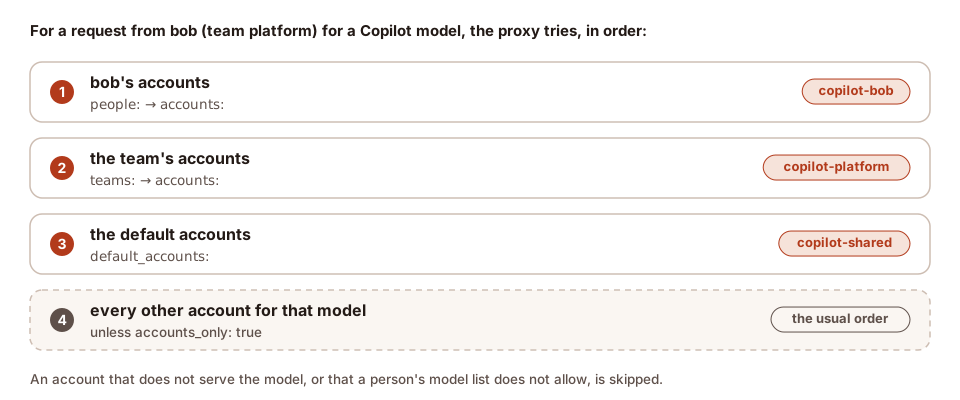
An account that does not serve the model, or that the person's model list does not allow, is skipped. With
accounts_only: true a person or team is limited to their own accounts. The usage log records which account served
each request (provider) and why (account_source: person, team, default or request). On a test proxy with
a team account and a default account, four requests came out like this:
$ maple-proxy usage query --group-by person,team,provider,account_source --metrics requests
Usage  (all requests)
  PERSON  TEAM      PROVIDER          ACCOUNT_SOURCE  REQUESTS
  alice   platform  copilot-platform  team                   1
  bob     platform  copilot-platform  team                   1
  carol   web       copilot-shared    default                1
  local   -         copilot-shared    default                1
  total                                                      4
Budgets (per person and per team, in AI units, per UTC day and month) and model lists work the same way: see Budgets, Models and Accounts.
C. Chained hubs #
When there is more than one proxy, chain them: each proxy uses the one above it as a provider of type: maple. A
laptop goes to a team hub, and the team hub goes to the top hub that holds the company's accounts.
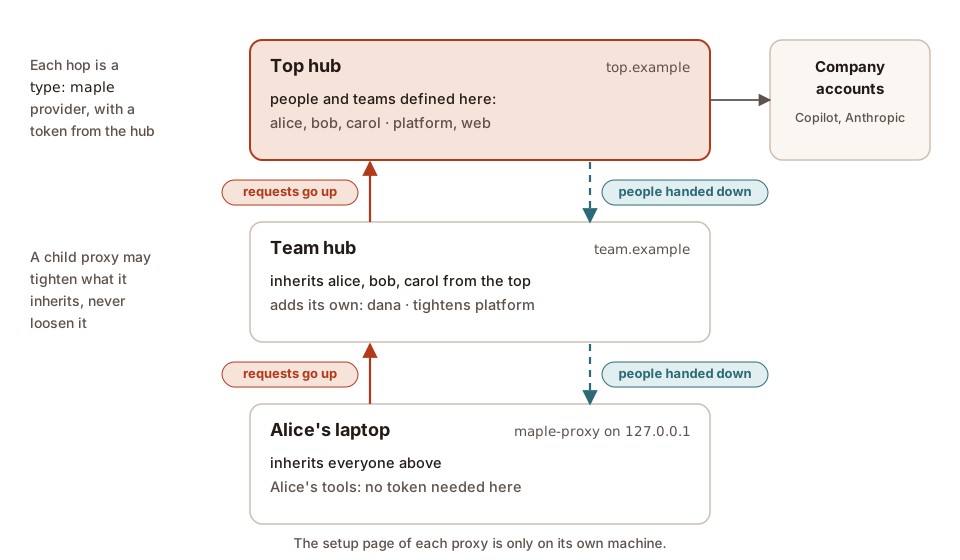
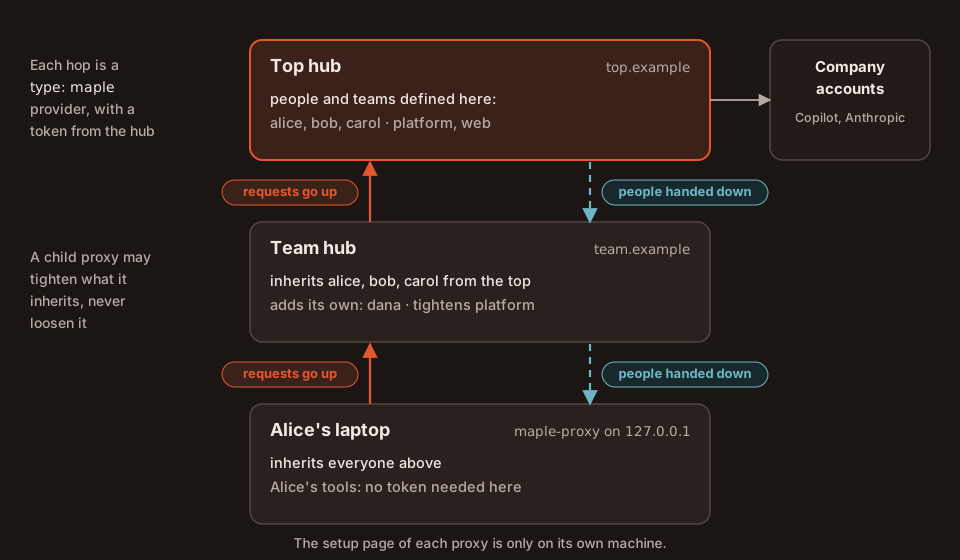
On the setup page (the quickest way): on the hub, Hubs & chaining, Let a proxy connect to this hub, make a
chain token for the proxy below; on the proxy below, Hubs & chaining, Connect this proxy to a parent hub, paste
the hub's address and the token, Test the connection, Save, and restart it. Step by step, with screenshots, in
Chain proxies into hubs. The same with commands and config.yaml:
1. On each hub, make a token for the proxy below it, and list the name the proxy below uses in allowed_hosts:
maple-proxy chain token platform-hubThe token has the proxy and proxy-chain scopes. Only a token with proxy-chain is trusted to say who asked, so a
person's own token can never claim to be someone else.
2. On the proxy below, add the hub as a provider and name it as the parent:
server:
  proxy_name: platform-hub           # a readable name in everyone's usage records
providers:
  - id: top
    type: maple
    base_url: https://top.example:11535/v1
    api_key: mh_...                  # the token from maple-proxy chain token
    models:
      - id: claude-sonnet-5
      - id: gpt-5-mini
chain:
  parent: top                        # inherit its people, send usage up to it
Then move the token into the secret store, which leaves a ${secret:...} reference in its place:
maple-proxy secrets migrateA hub's models are always reachable as <provider id>/<model> (top/claude-sonnet-5). List them under models: on
a hub in the middle of a chain: a laptop that asks its hub for hub/claude-sonnet-5 sends the plain name up, and in
our test the middle hub answered that the model "is not served by this proxy" (before 2.1.2: "no provider serves
model") until the model was listed there. base_url must be
https:// unless the hub is on this machine or your local network, or the provider is marked local: true.
3. Check it on the hub map (Hubs & chaining), or with maple-proxy chain status, on any proxy:
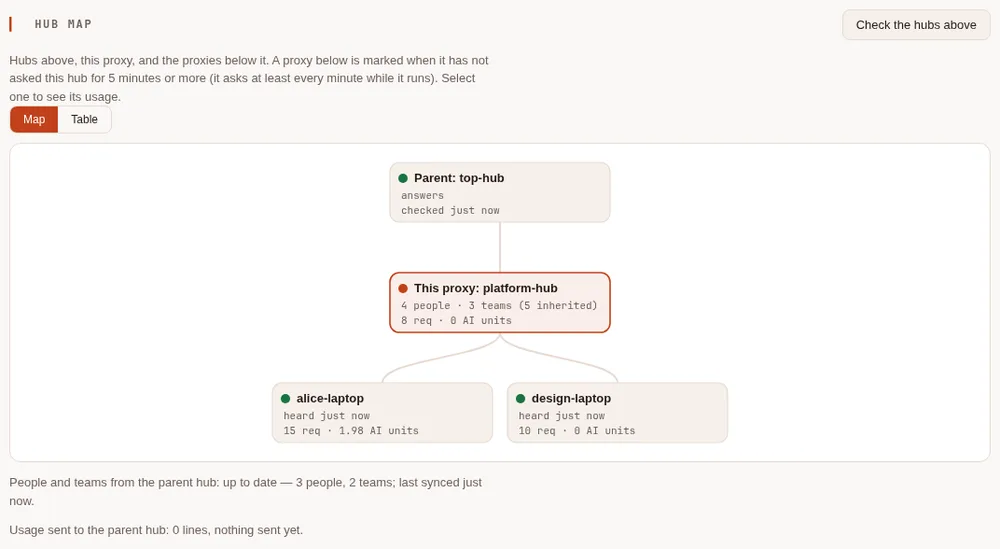
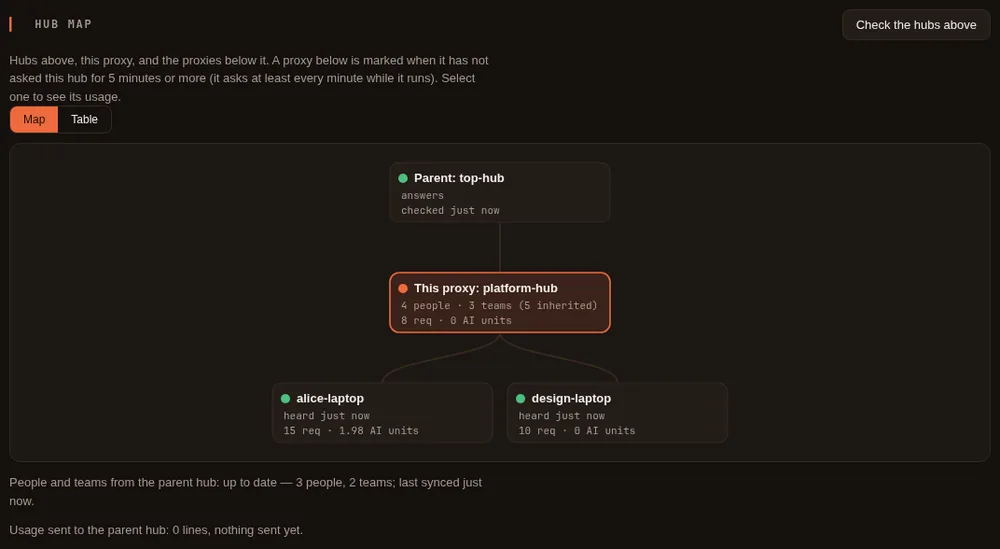
This proxy: alice-laptop, id mp-caf79a2b7a80304b; refuses requests that passed
  through more than 4 proxies.

Hubs above:
  hub (parent)
    address:  http://team.example:12835/v1
    answers:  yes (200)
    hub:      platform-hub (mp-f7e3245a0b6c5ff2); hubs above it: 1

People from hub: 4 people, 2 teams, 4 tokens; confirmed 2026-10-09T02:53:52Z.
People defined once, at the top #
Define the people and teams on the top hub. Every proxy below fetches them at start and again as soon as they change (it waits on the hub for news), with their budgets, model lists and accounts, and a check value for each of their tokens, never the tokens. So a person's token made at the top also works at the team hub and on a laptop below it.
A child can add people of its own, and can tighten an inherited entry, never loosen it. On the team hub in our demo:
$ maple-proxy people add dana --team platform
added dana; tie a token with: maple-proxy people tie-token dana <token-id>
$ maple-proxy teams budget platform --monthly 1000
team platform: budget daily no limit, monthly 1000 AI units
$ maple-proxy teams budget web --monthly 900
budget.monthly_ai_units 900.00 would raise the inherited 500.00; a hub may only lower it
A child has to have received its parent's people before it can add its own: until then the command answers "the parent hub's people cannot be read". The People card (on the setup page's People & teams tab) marks inherited entries and offers Tighten instead of Edit:
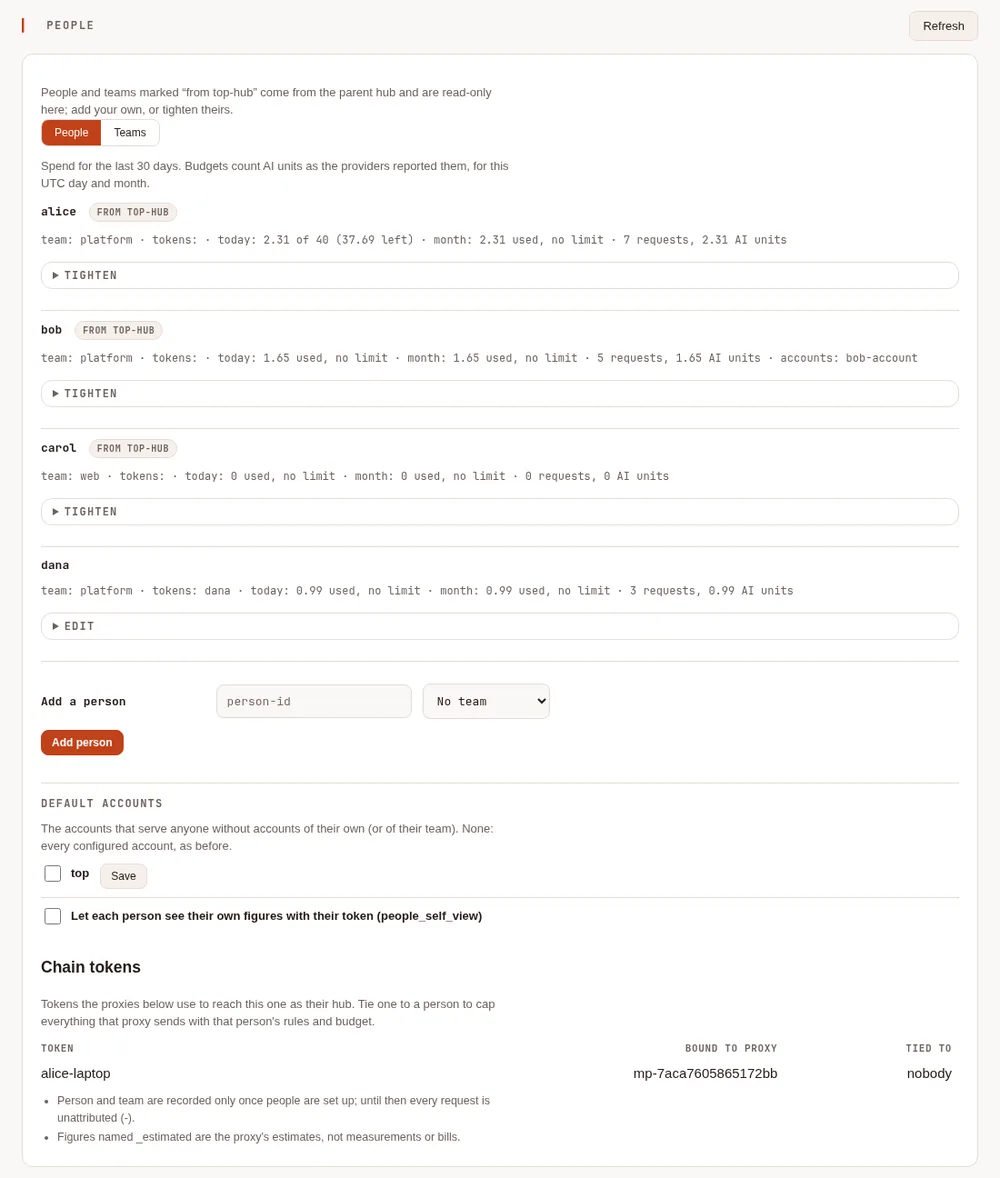
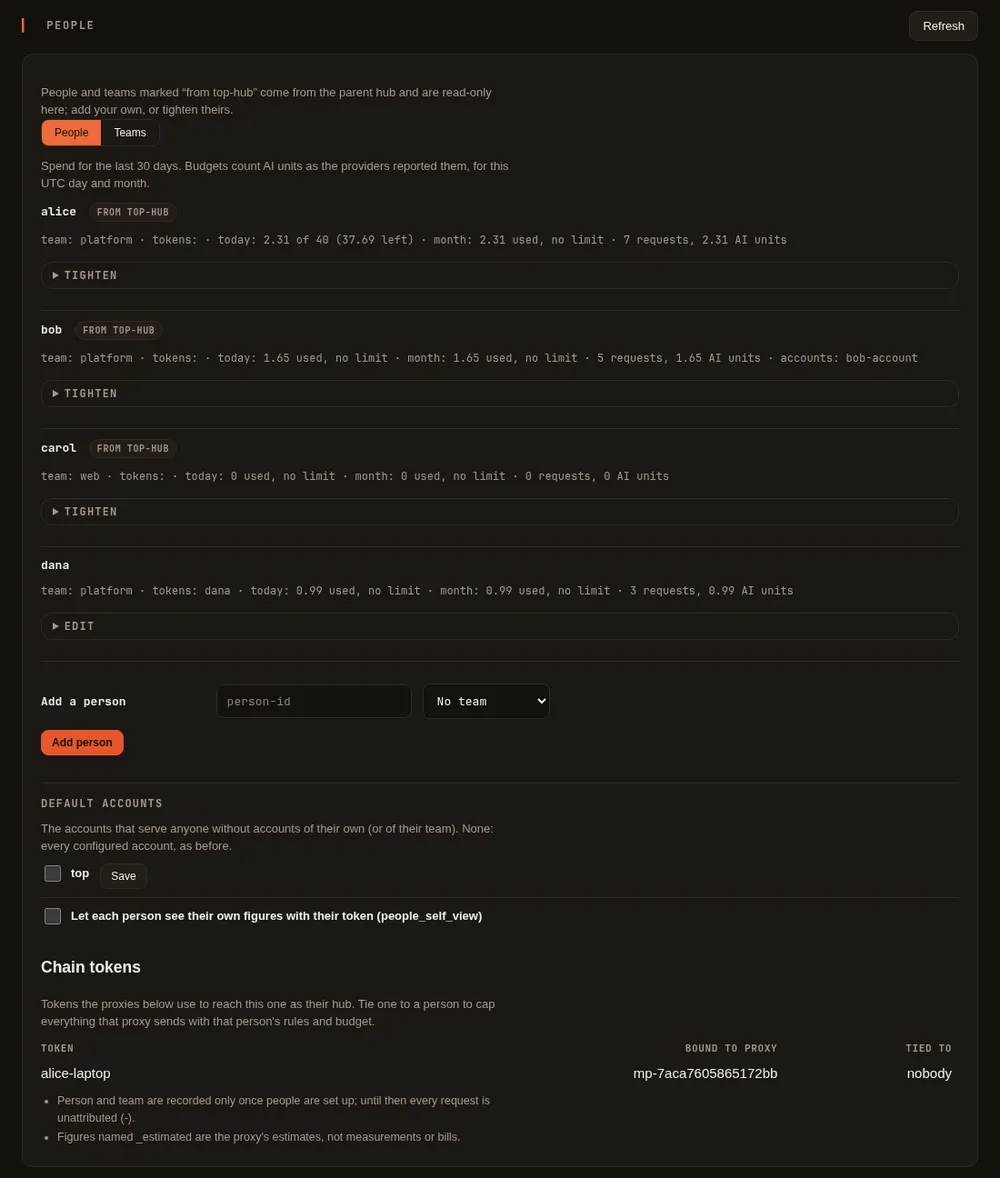
A person added on a child is unknown to the hub above it. There their requests are recorded as
name@proxy (dana@platform-hub, team platform@platform-hub), so they can never be taken for, or charged to, one
of the hub's own people, and the hub serves them with its own default accounts. Details are in Teams across chained hubs
and People and teams cascade down.
Who you are on your own laptop. Your tools on your laptop need no token. Their requests then count as local
on the laptop, and as local@alice-laptop on the hubs above. To be counted as yourself everywhere, give your tools
your own token from the top hub: it works on every proxy below it.
Usage rolls up #
Each proxy sends its usage records (counts and labels only, never prompts, answers or files) up to its parent, with
the records its own children sent it, so the top hub can report on the whole chain. Each request is counted once:
every hop shares one request id. If the parent is down, the child keeps its records and sends them when the parent
is back. It is on whenever chain.parent is set; chain.report_usage: off turns it off on that child.
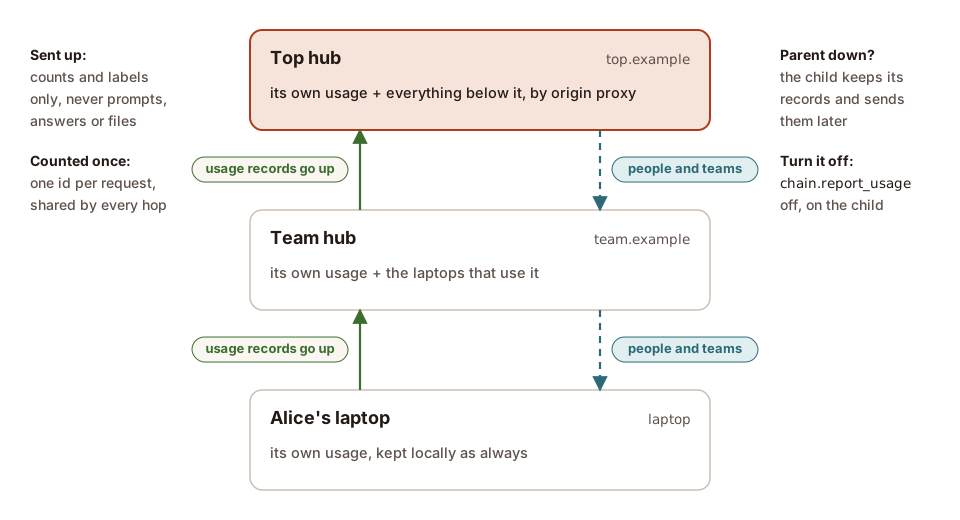
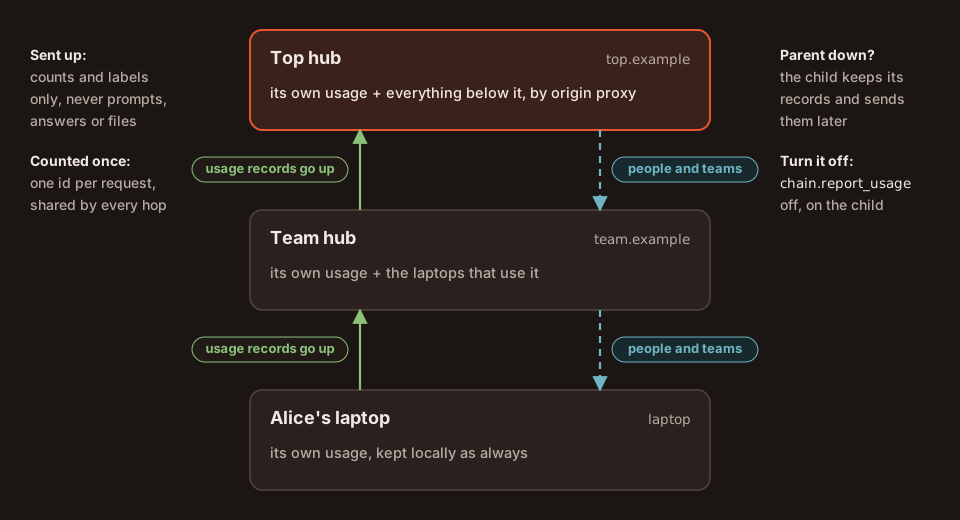
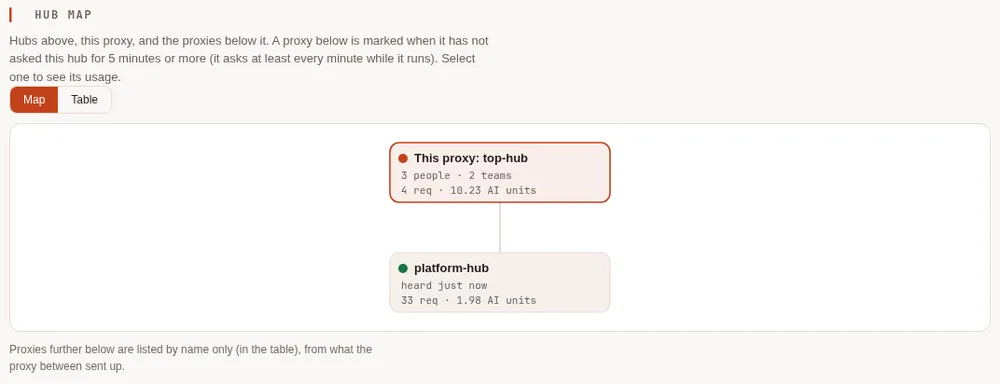
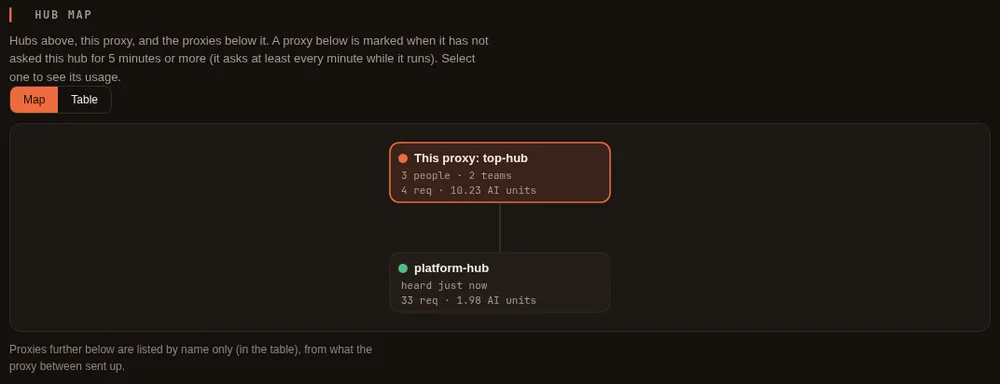
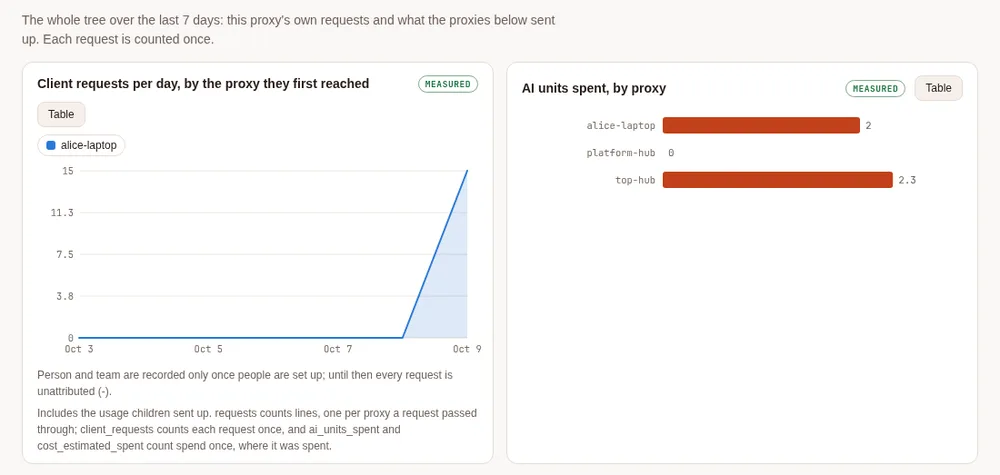
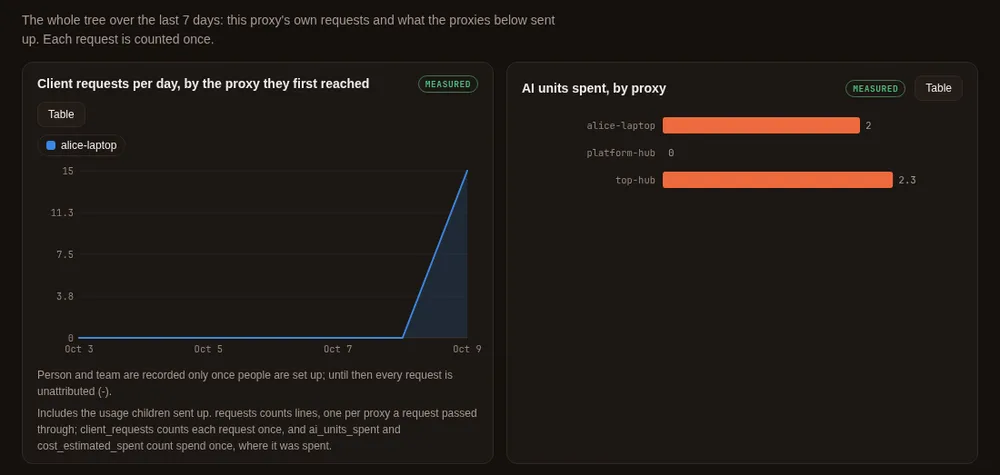
The top hub's Hubs & chaining tab draws the tree on its hub map, with each proxy's last seven days, and lists the proxies further below by name:
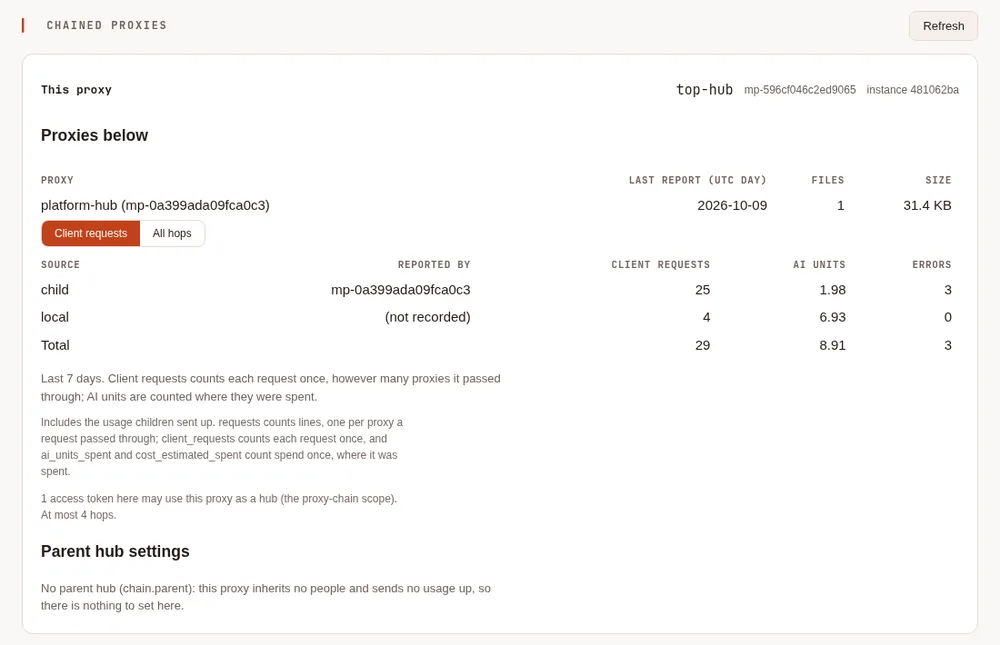
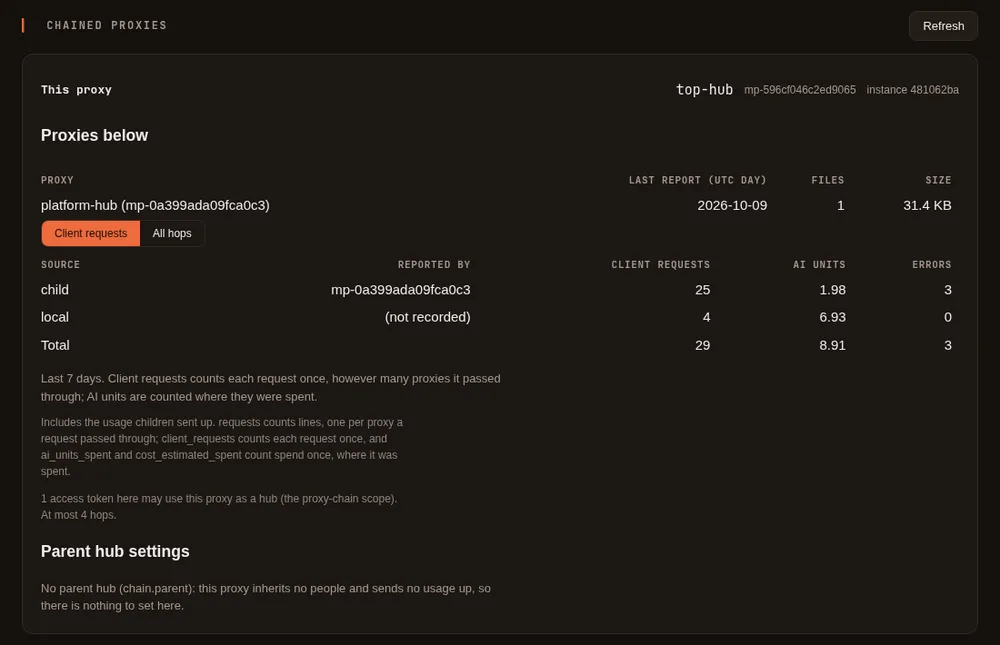
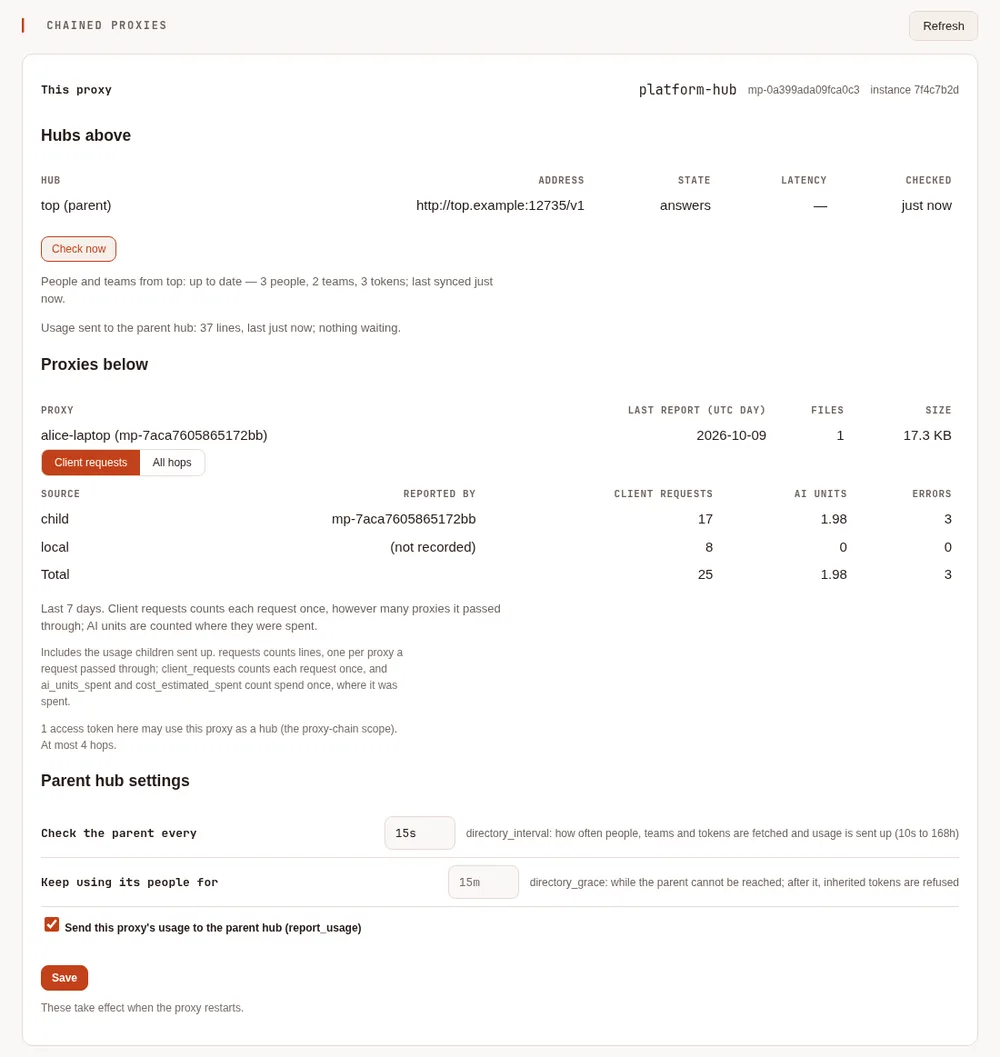
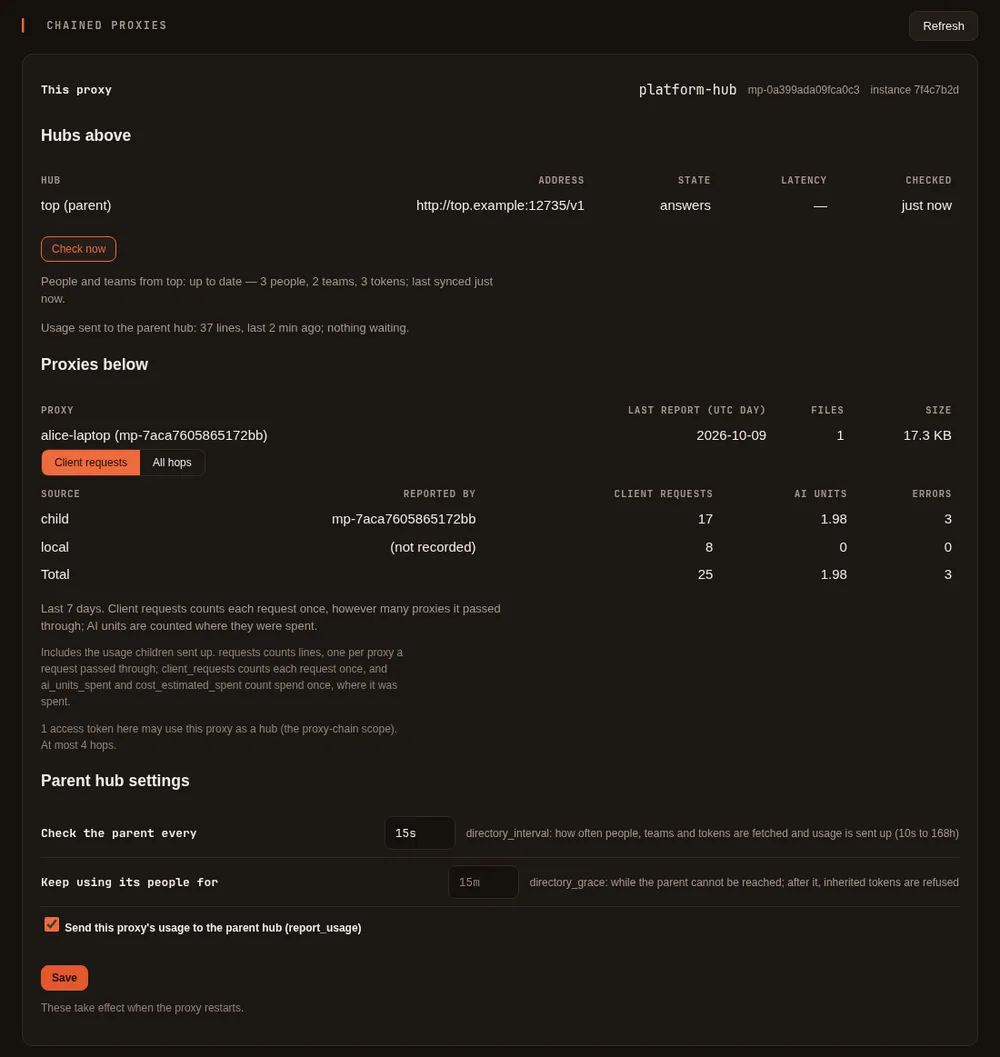
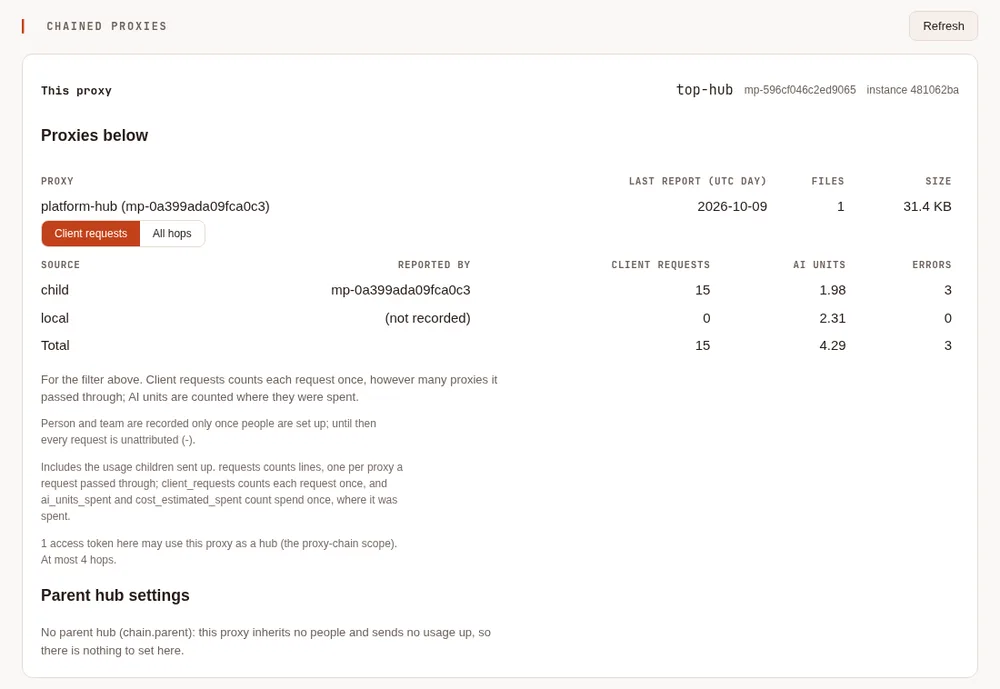
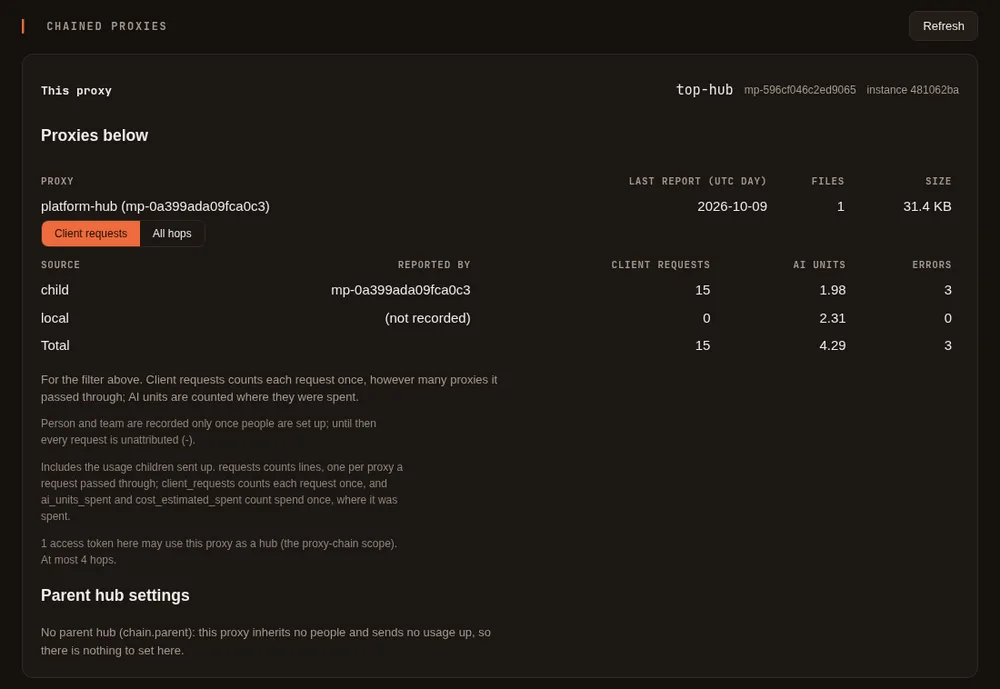
The same tab charts the whole tree's requests and spend, and its Chained proxies card shows the proxies below it and what they reported, counting each request once by default (All hops counts a line per proxy instead):
D. Fallback across the chain #
The pattern most people want from a chain is a fallback that crosses machines, either way round. Both are ordinary fallbacks on the proxy where you set them, so they work on any proxy in the chain.
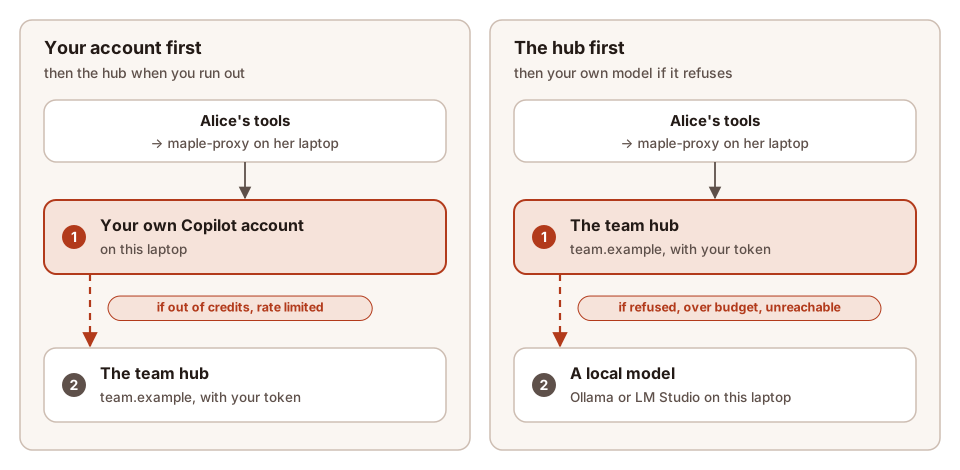
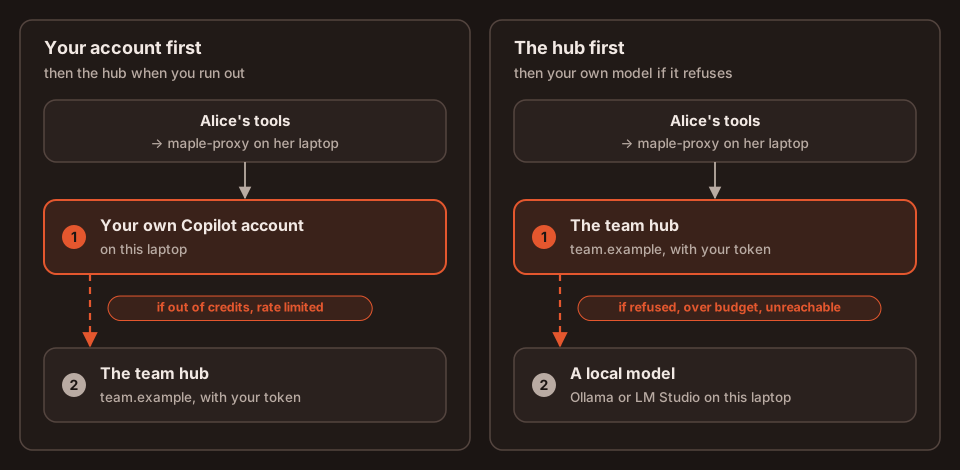
Your own account first, the team hub when you run out #
On your laptop: your own Copilot account serves your requests, and when it is out of credits or rate limited they go to the team hub, for the same model.
providers:
  - id: hub
    type: maple
    base_url: https://team.example:11535/v1
    api_key: ${secret:hub-token}
  - id: copilot
    type: github-copilot             # as set up by maple-proxy auth login github-copilot
chain:
  parent: hub
provider_fallbacks:
  copilot: [hub]                     # or [hub/<model>] for a different model at the hub
While your account is marked as out of quota, later requests go straight to the hub (the route reason is
exhausted-order), and back to your account once its wait is over. The answer says what happened:
X-Maple-Fallback-From: copilot/claude-sonnet-5 (quota exhausted)
X-Maple-Router: via hub: top/claude-sonnet-5 [via top: copilot-company/claude-sonnet-5]
X-Maple-Served-By: hub/claude-sonnet-5
The hub first, your local model when the hub says no #
Everything goes to the hub, and a model on your own machine answers when the hub refuses (a budget there is spent, its accounts are out of quota) or cannot be reached:
providers:
  - id: hub
    type: maple
    base_url: https://team.example:11535/v1
    api_key: ${secret:hub-token}
  - id: ollama
    type: ollama
    base_url: http://127.0.0.1:11434/v1
    models: [{id: qwen3-coder}]
provider_fallbacks:
  hub: [ollama/qwen3-coder]
With the team hub stopped, the answer came from the local model:
X-Maple-Fallback-From: hub/claude-sonnet-5 (unreachable)
X-Maple-Served-By: local/qwen3-coder
and with the top hub's account out of quota, two hubs up, the same:
X-Maple-Fallback-From: hub/claude-sonnet-5 (quota exhausted)
X-Maple-Served-By: local/qwen3-coder
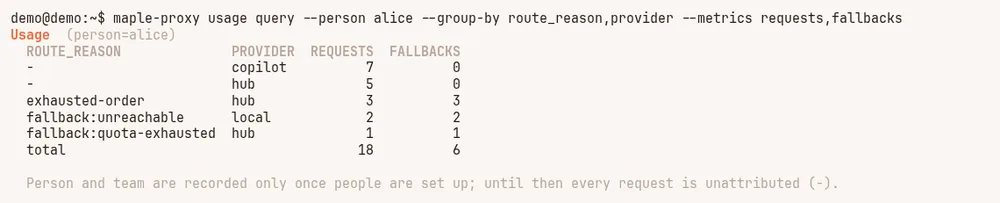
Both can be set on one laptop, as in the demo below. model_fallbacks works too, for one model at a time; see
The two common setups and Fallbacks. The usage log says
why each fallback ran:
E. See who used what #
Every proxy in the chain records, on each request, who asked (person, team), which proxy they asked
(origin_proxy), the path (via, hops), the account that served it and why (provider, account_source,
route_reason). Filter by any of them on the setup page, with maple-proxy usage query, or in DuckDB.
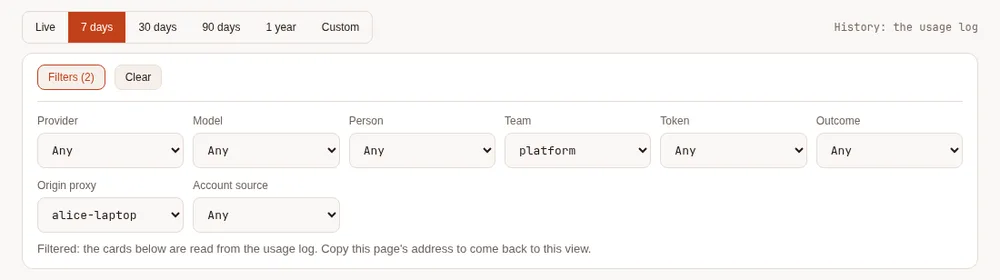
On the setup page, the filter bar above the data tabs offers Person, Team, Origin proxy, Proxy and Account source once there are two values to choose between, and every card follows it. Here the top hub shows only the platform team's requests that started on Alice's laptop:
With usage query on the top hub, for the whole chain:
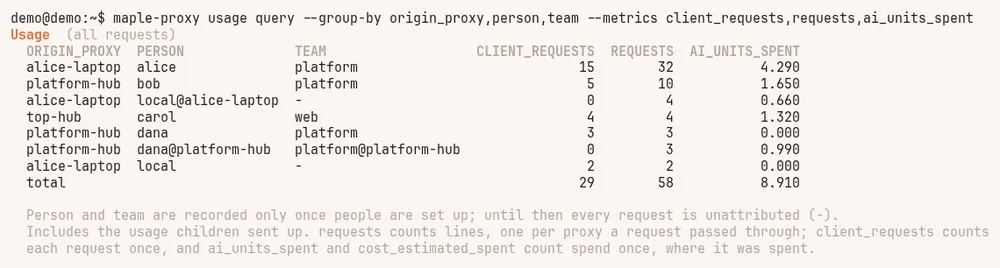
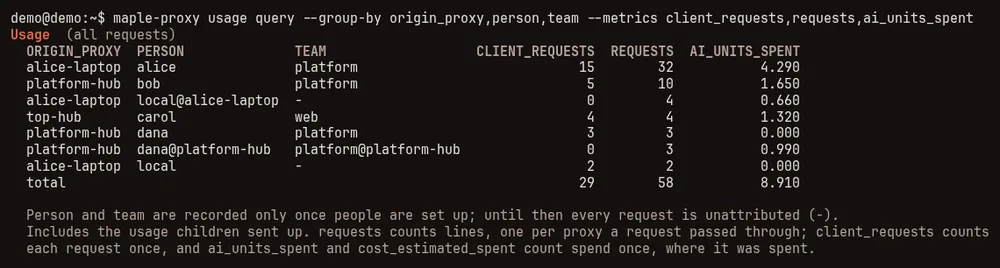
client_requests counts each request once; requests counts a line per proxy it passed through. People the top hub does not know (dana, added on the team hub, and Alice's tools without a token) appear twice here: under the child's name where the request started, and as name@proxy on the top hub's own line, where the AI units were spent. The maple.origins view below puts them together.maple-proxy usage query --last 7d --group-by origin_proxy,person
maple-proxy usage query --team platform --group-by person,provider,account_source
maple-proxy usage query --person alice --group-by route_reason,provider
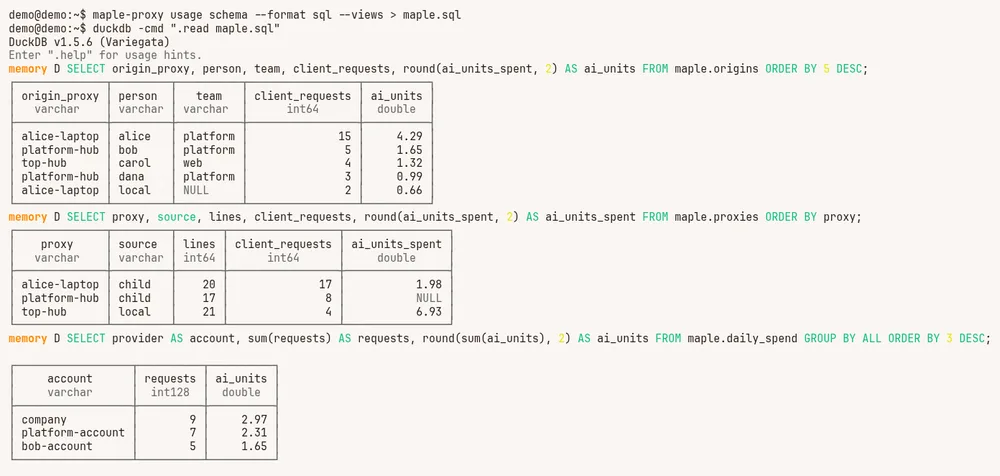
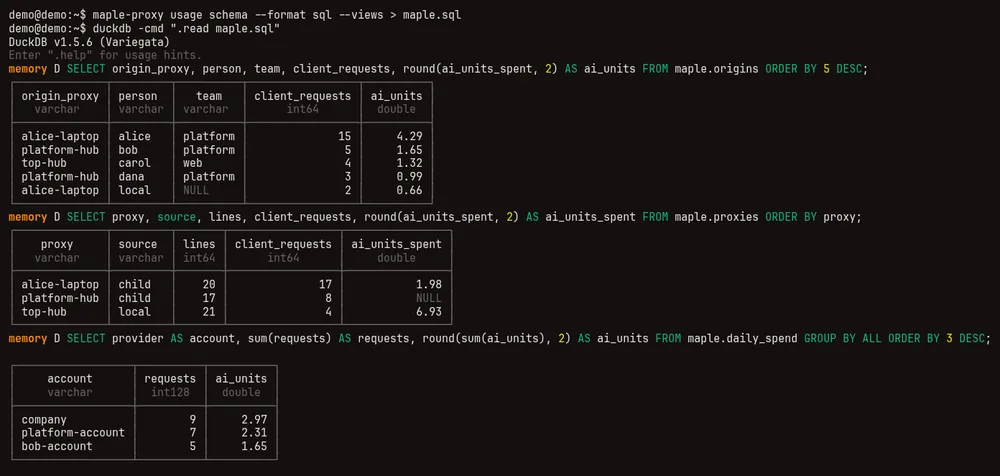
maple-proxy usage query --proxy alice-laptop --source child # only what a proxy below sent upIn DuckDB, maple-proxy usage schema --format sql --views makes the named views, including maple.people,
maple.daily_spend, maple.origins (per first proxy and person, each request once) and maple.proxies (per proxy):
SELECT person, team, requests, round(ai_units, 2) AS ai_units, origin_proxies FROM maple.people ORDER BY ai_units DESC;
SELECT origin_proxy, person, team, client_requests, round(ai_units_spent, 2) AS ai_units FROM maple.origins ORDER BY 5 DESC;
SELECT provider AS account, sum(requests) AS requests, round(sum(ai_units), 2) AS ai_units FROM maple.daily_spend GROUP BY ALL ORDER BY 3 DESC;
All figures are AI units as the providers reported them, or estimates labelled _estimated; neither is a bill. More
queries are in See and filter your usage and Named views.
To keep the whole chain's history past the top hub's retention, give the top hub a lake: its own lines and the ones sent up from below go into it together (Hubs: every proxy's data in one lake).
F. Day to day: revoking, outages and security #
Revoking someone. Revoke their token on the proxy that made it (the setup page's token list). It stops working
there at once, and on every proxy below within seconds while the hubs answer, one hop after another (a proxy below
that cannot reach its hub keeps the last copy for up to chain.directory_grace, 15 minutes by default). To stop a whole
proxy below, revoke its chain token on its hub (Hubs & chaining, the token's Revoke); when a proxy below is
replaced, Unbind its token so the new one can use it.
Watching the chain. The hub map marks a proxy below that has not asked its hub for five minutes (it asks at least
every minute while it runs), so a stopped laptop or a broken network shows up without anyone reporting it. Removing a person from people: stops their budget and rules
applying; revoking the token is what stops the requests.
When a parent hub is unreachable:
- requests that have a fallback set go to it (see D); requests without one fail
with
unreachable; - the child keeps using the people it fetched last for
chain.directory_grace(15 minutes by default); after that it refuses the inherited tokens until the parent answers again, and keeps serving its own people; - usage records wait on the child and are sent when the parent is back, never counted twice. In the demo, the two requests made while the team hub was stopped reached the top hub's figures once it was running again.
Security, in short:
- Reach a hub over HTTPS, or over a private network such as Tailscale or a VPN. The tokens travel with every request.
- One token per person and per proxy below, never shared. Treat tokens like passwords; Maple keeps them in your
secret store and writes only references into
config.yaml. - The setup page stays on its own machine: signing in to providers, the People card, chain tokens and connecting to a hub are only there. Through single sign-on, team admins see the hub map without addresses or tokens.
- Only a token with the
proxy-chainscope may say who asked. Give it only to proxies you run. - More in Security.
What is not covered, and what is not verified #
- Downgrading. A proxy older than 2.0 ignores
people:,teams:anddefault_accounts:and keeps working, but no budget, model list or account rule applies and requests are no longer attributed (see Going back to an older version). A chain was not tested with an older proxy in it. - Older usage. Requests from before 2.0, or before people were set up, are unattributed:
personis empty andorigin_proxyunknown. - Not verified: the screenshots and outputs on this page come from a demo on one Linux machine, with three proxies on loopback reached by name over plain HTTP, and stand-in model services in place of Copilot and the other providers. Chains over HTTPS between machines, with real GitHub Copilot accounts, and on macOS or Windows, have not been tried yet.
Related #
- Teams: every key for people, teams, tokens, budgets and accounts on one proxy.
- Chain proxies into hubs: every key for one proxy using another.
- The proxy and its setup page: the setup page's cards, including People.
- See and filter your usage and Your usage data: queries, exports and DuckDB.
- Your data: PostgreSQL for the live data, a DuckLake for the history, and The Maple data lake to set it up for a team.