
Run the proxy on Kubernetes #
On this page
This page runs maple-proxy on Kubernetes from the samples in the infra/ folder of the
public repository: plain manifests with Kustomize
overlays for one replica, or three replicas sharing PostgreSQL and Redis. They are starting points: read them and
adapt them to your cluster. Not sure you need a cluster, or several replicas? See
Which setup do I need?.
In plain words #
- What it is. Sample manifests to run the proxy on Kubernetes: one replica, or three sharing PostgreSQL and Redis.
- Why you want it. A team proxy that survives a node going away, configured the way the rest of your cluster is.
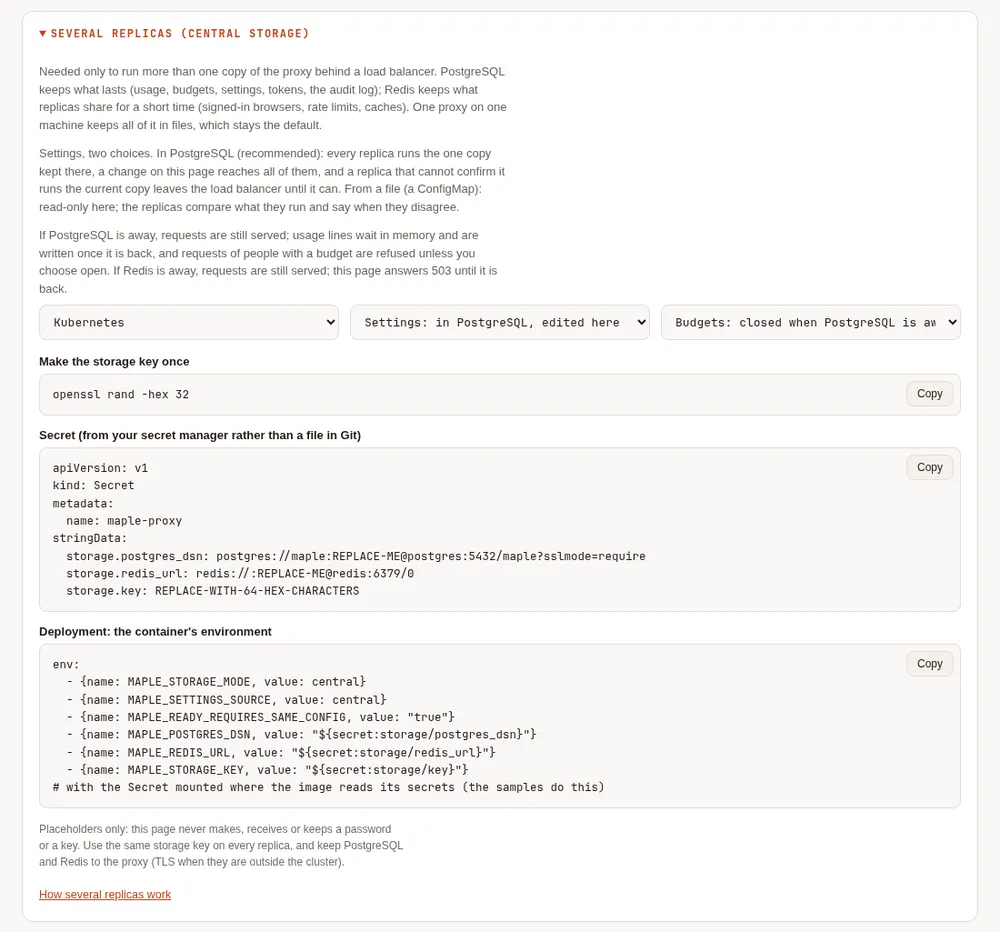
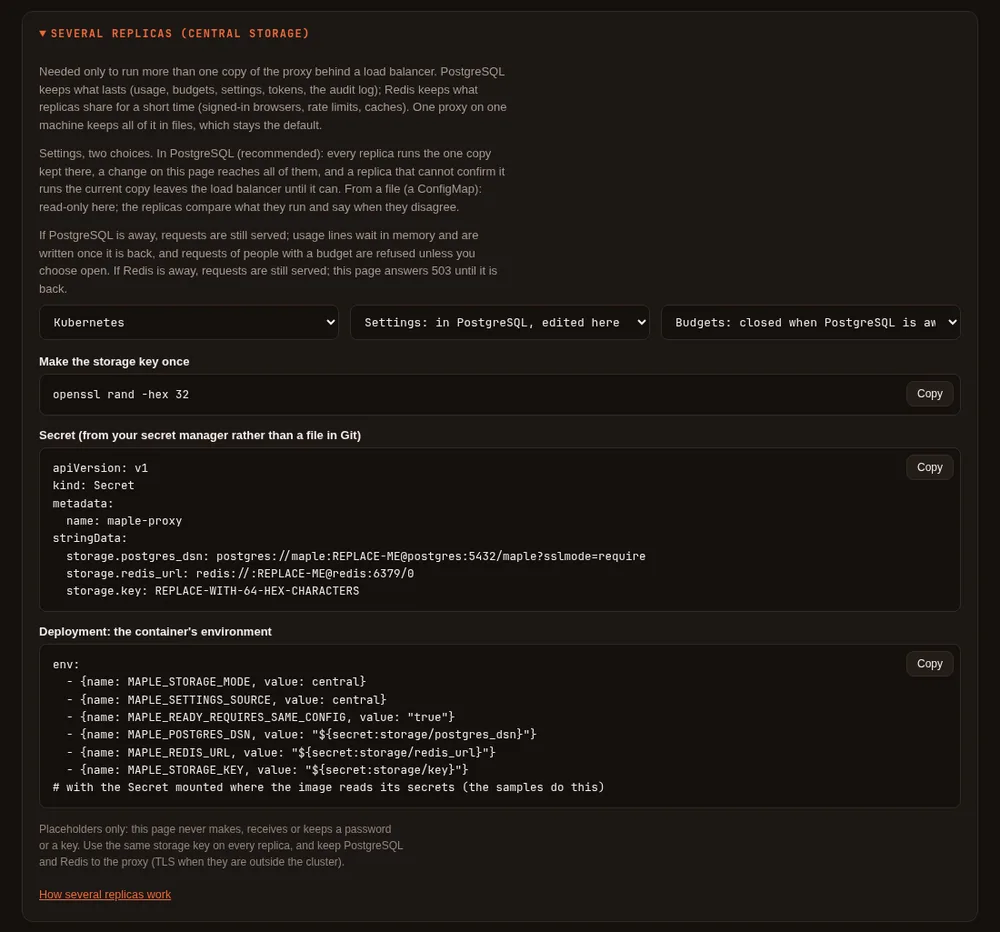
- What you see on the setup page. With several replicas, settings are kept in PostgreSQL and changed on any replica's page (recommended), or come from a ConfigMap and are read-only there. Data & storage says whether PostgreSQL and Redis answer, whether every replica runs the same settings, and makes the snippets for the secrets; Set up more, Several replicas (central storage), explains when you need it.
The samples #
| Folder | What it is |
|---|---|
manifest/maple-proxy/ | The proxy: Deployment, Service, PodDisruptionBudget, an example ConfigMap and an example Secret |
manifest/postgres/, manifest/redis/ | One PostgreSQL and one Redis, for trying it out. In production use your managed or production services, with backups |
manifest/maple-mcp-hub/ | The MCP hub as one replica of its own |
config/single/ | One replica, its state on a PersistentVolumeClaim: the proxy as on a machine |
config/ha-shared/ | Recommended for several replicas: three replicas, shared state in PostgreSQL and Redis, settings kept in PostgreSQL (copied from the ConfigMap once) |
config/ha/ | Three replicas, shared state in PostgreSQL and Redis, settings from the ConfigMap (read-only on the page) |
config/ha-redis/, manifest/redis-durable/ | Three replicas and one Redis that keeps its data, no PostgreSQL (storage mode redis, 2.3). Supported; config/ha-shared stays the recommendation |
manifest/maple-lake/, config/ha-lake/ | Usage history in a DuckLake (see Usage for analysis) |
config/cloud-identity/aks/, config/cloud-identity/gke/ | Components that give the proxy the cluster's workload identity, for Azure and Google Cloud with no stored key |
config/cloud-identity/eks/ | A component that gives the proxy an IAM role (IAM roles for service accounts, or EKS Pod Identity), for Amazon Bedrock with no stored key |
Every pod runs as a non-root user with a read-only root file system, no added capabilities, the default seccomp profile and no service-account token; it has liveness, readiness and startup probes, resource requests and a memory limit.
One replica #
1. Build and push the image (no image is published; see Docker):
git clone --depth 1 https://github.com/kinncj/maple-harness-dist.git
cd maple-harness-dist/infra/docker
docker buildx build --build-arg MAPLE_VERSION=v2.0.0 --platform linux/amd64,linux/arm64 \
  -t registry.example.com/you/maple-proxy:2.0.0 --push .
2. Set the image and the secrets. In config/single:
cd ../config/single
kustomize edit set image maple-proxy=registry.example.com/you/maple-proxy:2.0.0
Edit manifest/maple-proxy/secret.example.yaml (or create the Secret maple-proxy from your secret manager): the
key access.proxy_tokens holds one label=value per line, the tokens your tools use (with mh_ in front). Each key
of the Secret is a file in /run/secrets/maple, read-only.
3. Apply and check:
kubectl apply -k .
kubectl -n maple rollout status deploy/maple-proxy
kubectl -n maple logs deploy/maple-proxy
Tools in the cluster reach http://maple-proxy.maple.svc:11535/v1 (OpenAI) and :11537 (Anthropic). From outside,
add an Ingress or a LoadBalancer Service with HTTPS. The proxy answers only to host names it knows:
MAPLE_ALLOWED_HOSTS in the Deployment lists the Service's names; add yours.
The setup page is served only on the pod's own loopback address, as on a machine. Reach it with a port forward, which connects to the pod itself:
kubectl -n maple port-forward deploy/maple-proxy 11539:11539and open http://127.0.0.1:11539. In this overlay, settings are kept on the volume like on a machine: change them on
the page. For team admins who should sign in with their company account (Google, Microsoft Entra ID, Okta, GitHub)
through an Ingress instead, see Single sign-on for the setup page. The models for search by meaning download to their own volume (maple-models).
Several replicas #
When you need it #
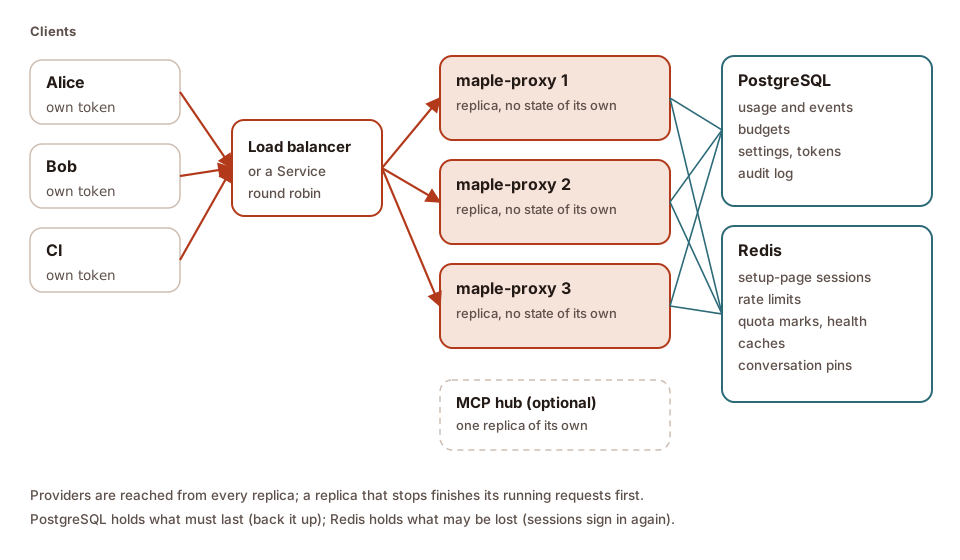
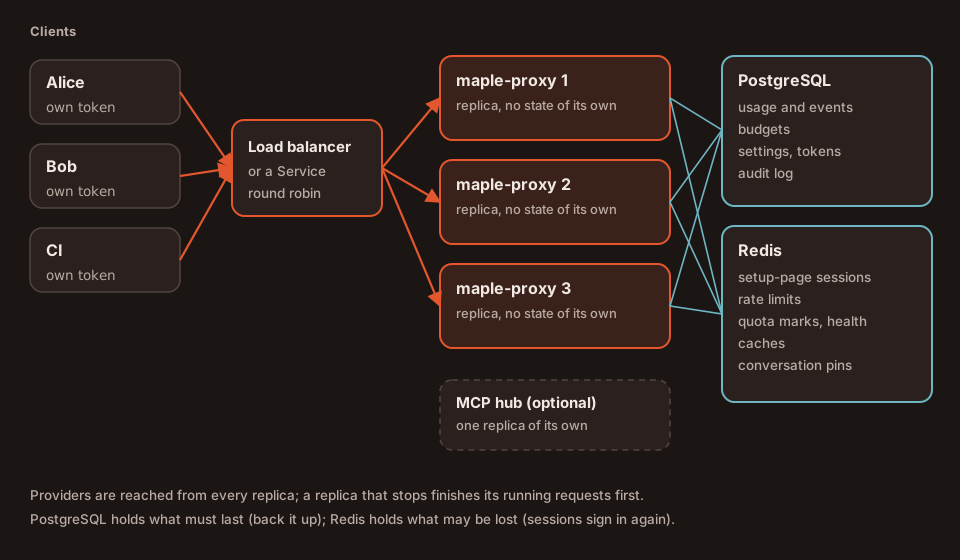
One replica is enough for most teams: the proxy is light, and a restart takes seconds. Run several when a restart or a
lost node must not interrupt anyone, or when one replica is not enough. Several replicas need PostgreSQL and Redis
(storage.mode: central): a replica then keeps nothing that matters on its own, so any replica can serve any
request, and a replica can stop at any time. Without PostgreSQL, one Redis that keeps its data can hold everything
instead (storage mode redis); PostgreSQL and Redis together stay the
recommendation.
What lives where #
| What | One replica (storage.mode: disk, the default) | Several replicas (storage.mode: central) |
|---|---|---|
| Usage log | Daily files on the volume | PostgreSQL (each line once), and a copy on each replica's own folder |
| Events, alerts fired | Files on the volume | PostgreSQL; each alert fires once, on one replica |
| Audit log | A file on the volume | PostgreSQL too (maple-proxy audit tail reads both) |
| Person and team budgets | Counted in memory from the usage log | PostgreSQL, counted as each request ends; the day is the database's |
Provider budgets (budgets:) | Counted in memory from the usage log | Each replica counts every replica's requests, within seconds |
Settings (config.yaml) and access tokens | Files on the volume | PostgreSQL (storage.settings: postgres, the default), or the ConfigMap and Secret (storage.settings: file, read-only on the page) |
| The setup page's password | A file on the volume | PostgreSQL |
| Signed-in browsers, wrong-password counts | Memory and a file | Redis |
| Rate limits, bad-token throttle | Memory | Redis |
| Quota marks, provider health | Memory | Redis |
| Response and embeddings caches | Memory (and a file for embeddings) | Redis, encrypted with the storage key (storage.encryption_key) |
| Conversation pins | none | Redis |
Repeated requests (Idempotency-Key) | Memory | Redis |
| Cards (cache, savings, sessions) and learned prices | Memory, saved to files | Rebuilt from every replica's usage in PostgreSQL |
| Embedding models | The volume | Each replica's folder, or one shared volume |
| The MCP hub | In the proxy | One replica of its own |
Set it up #
config/ha adds PostgreSQL and Redis samples and three replicas, with settings from the ConfigMap; config/ha-shared,
the recommended one, builds on it and keeps the settings in PostgreSQL (see
how settings reach every replica):
cd config/ha
kustomize edit set image maple-proxy=registry.example.com/you/maple-proxy:2.0.0
Edit the Secret patch in kustomization.yaml (and manifest/postgres/service.yaml's password, the same in both):
| Secret key | What it holds |
|---|---|
storage.postgres_dsn | postgres://user:password@host:5432/db?sslmode=require |
storage.redis_url | redis://:password@host:6379/0, or rediss:// for TLS |
storage.key | The storage key, storage.encryption_key (MAPLE_STORAGE_KEY, read from this Secret key as ${secret:storage/key}): 64 hex characters (openssl rand -hex 32). It encrypts what goes to Redis and signs the shared settings |
proxy.request_hash_salt, embeddings.cache_key, events.fingerprint_key | Optional. Left out, each is derived from storage.key, so every replica has the same ones and the shared caches work across replicas. If you set them, 64 hex characters each, the same for every replica: a replica refuses to start with a placeholder such as REPLACE-ME, or with values other than those of a replica that is running (to change them, or storage.key, stop every replica first) |
The Deployment refers to them as ${secret:storage/postgres_dsn} and so on, never by value. Then:
kubectl apply -k .
kubectl -n maple rollout status deploy/maple-proxy
The first replica creates the tables (the others wait for it), and each replica's start line says
storage=central with its name.
On the setup page #
The setup page's Data & storage tab has a section, Several replicas (central storage), that explains what it
is for and writes the settings for you to copy. Pick where the proxy runs (Docker Compose, Kubernetes or
systemd), where the settings live (in PostgreSQL, edited on the page, recommended, or from a file, read-only on
the page; see below), and whether budgets are closed or open while PostgreSQL is away. It then shows the
environment variables and the Secret (or secret files, or an environment file) to use, each with a copy button. The
connection strings, passwords and storage key in them are placeholders: the page never asks for, makes, receives or
stores a connection string, a password or a key. The storage settings themselves are set in the environment or
config.yaml, never on the page. On the Set up more tab, Several replicas (central storage) leads there too.
When the replica whose page you opened runs in central mode, the tab also shows its view of the shared storage, read-only:
| Line | What it says |
|---|---|
| Mode | central (PostgreSQL and Redis, shared by every replica) or disk |
| Settings | kept in PostgreSQL, where every replica runs the copy kept there, or from config.yaml (a ConfigMap), read-only on the page |
| This replica's settings | shared settings only: the store's current copy, with when that was last confirmed, or not confirmed (this replica is then not ready) |
| Settings per replica | how many replicas run, whether they run the same settings, and each one's digests and since when (not named through single sign-on) |
| PostgreSQL, Redis | reachable, or not reachable from this replica |
| Tables | the tables' version, and "up to date"; an older version is created by a replica of this release at its start |
| Replicas seen | the replicas that stored usage in the last hour, by name. A replica with no traffic is not seen |
| Shared keys | the same on every running replica; otherwise this one is not ready |
| Usage lines waiting | lines kept in memory while PostgreSQL is away, of the most it keeps, and any dropped since the start |
| Budgets while PostgreSQL is away | closed (requests of people with a budget are refused with 503) or open (let through, uncounted) |
| Kept in PostgreSQL | how many days of usage and events are kept, or everything when no retention is set |
Run several replicas: how settings reach every replica #
In plain words. Every replica has to run the same settings (config.yaml) and accept the same access tokens.
There are two ways to do that; pick one:
- Settings in PostgreSQL (recommended). The replicas keep one copy of the settings in the PostgreSQL they
already share. Change a setting on any replica's setup page and every replica runs it within seconds. The replicas
cannot drift apart: every replica runs the same configuration, and one that cannot confirm it is current leaves
the load balancer until it is. Sample:
config/ha-shared(Kubernetes),compose.ha-shared.yaml(Docker). - Settings from a file (a ConfigMap). You manage
config.yamllike the rest of your cluster (GitOps). The setup page shows the settings but does not change them: you edit the ConfigMap and roll the replicas out. Replicas can drift apart (a rollout that stopped half way, a pod edited by hand): Maple tells you when they do, and can take the odd one out of the load balancer. Sample:config/ha(Kubernetes).
| Settings in PostgreSQL (recommended) | Settings from a file (ConfigMap) | |
|---|---|---|
Where config.yaml and the tokens live | PostgreSQL, signed | The ConfigMap and the Secret |
| Change a setting | On any replica's setup page, or storage import-config; every replica runs it within seconds | Edit the ConfigMap, roll the replicas out; read-only on the page |
| Can replicas run different settings? | No, by design: a replica that cannot confirm it runs the current copy is not ready | Yes, for a while: Maple reports it, and takes the odd one out with ready_requires_same_config |
| Two people saving at once on two replicas | The first saved wins; the other is told nothing was saved | Not possible (read-only) |
| Backups | With the database (pg_dump), or storage export-config | Your Git repository |
| When PostgreSQL is away | Settings cannot change; replicas are not ready (as for usage and budgets) | Settings keep working; replicas are not ready (usage and budgets need PostgreSQL) |
| What to watch | /readyz | /readyz, and /healthz or the setup page for replicas that disagree |
| A good fit when | Admins change settings on the page; you want no drift | Every change goes through review and Git |
What you get with settings in PostgreSQL (technical) #
storage.settings(orMAPLE_SETTINGS_SOURCE) ispostgresorfile.central, the 2.0 name, still meanspostgres, and is still the default in central mode. If you may go back to a 2.1.x image, writecentral: 2.1.x refuses to start withpostgres. The samples usecentralfor that reason.- PostgreSQL holds the one copy of
config.yaml, the access tokens and the files kept with them (the proxy-chain bindings and the developer-access directory). A replica runs that copy, and checks every 2 seconds (storage.settings_check_seconds, at most 10) that it still does. A notice through Redis makes every replica take a change at once; the checks catch any notice that is lost. - Not ready until current. A replica that cannot confirm it runs the current copy for about three checks (8
seconds with the default) answers
/readyzwithnot readyuntil it can again; requests already running finish. A replica that cannot read the settings at start does not start. - Writes go to PostgreSQL. A save on the setup page, a token made or revoked, a device paired: each is written to PostgreSQL before it is answered, and every replica (the one you used included) then runs it. When PostgreSQL cannot be reached, the change is refused and nothing changes. When another replica saved first, the later save is refused, nothing of it is kept, and the page asks you to reload and try again.
- A change made with the command line inside one replica (
kubectl exec ... maple-proxy token add) is offered to PostgreSQL at the next check, the same way: kept everywhere, or put back if another change was saved first. - The first start. When PostgreSQL holds no settings yet, the first replica copies in
storage.settings_seed(MAPLE_SETTINGS_SEED, the ConfigMap's file in the sample) or, without one, its ownconfig.yaml, and says so in its log, once. After that the copy in PostgreSQL is the one that counts: a later change to the ConfigMap is not read. - The settings are signed with a key derived from
storage.encryption_key: someone who can write to the database without that key cannot change them. A changed copy is refused, a replica puts its last good copy back, writes aSECURITYline to its log and records asettings.refusedevent. The newest version of each settings file is also recorded, signed, in Redis: putting an older copy back into PostgreSQL then also takes write access to Redis. When a newer copy was written and then changed before any replica read it, no replica puts its older copy back: they stay not ready until a good copy is written again (storage import-config --force).
Replicas that disagree (both choices) #
Each replica publishes, every few seconds, short digests of the settings it runs (never the settings), signed with a key derived from the storage key: an entry anyone else writes is ignored. When replicas have run different settings for more than 30 seconds:
- Data & storage shows it under Settings per replica, with each replica's digests and since when, and What's configured marks central storage needs attention. Through single sign-on the replicas are counted, not named;
/healthzadds a line,replicas disagree on config(it still answers200: a restart would not help; the probe needs no token, so it names no replica and no time), and each replica's log names the replicas, and since when, once when it begins and once when it ends;- with settings from a file and
storage.ready_requires_same_config: true(MAPLE_READY_REQUIRES_SAME_CONFIG; both samples turn it on), a replica whose settings differ from those most replicas run answers/readyzwithnot readyonce the disagreement has lasted two minutes (as this replica saw it), long enough for a rolling update to replace every replica. When as many replicas run each version, none is taken out, and the page and/healthzstill say so.
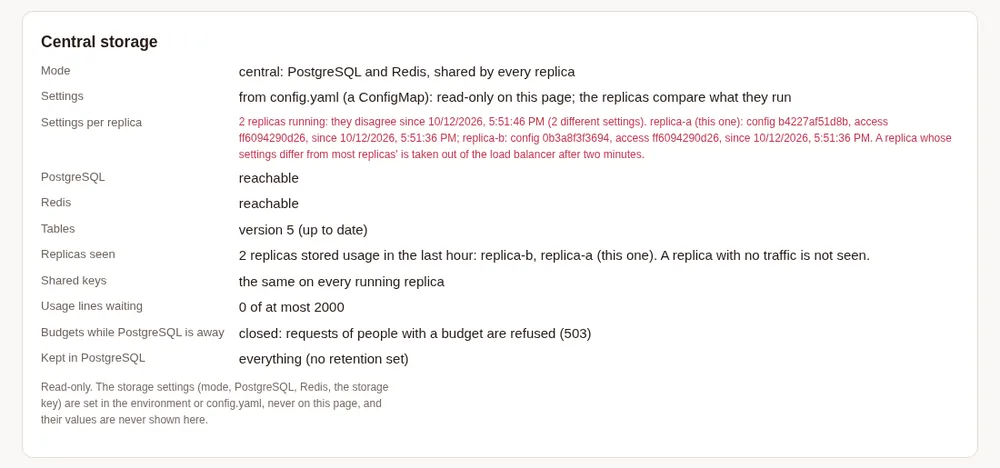
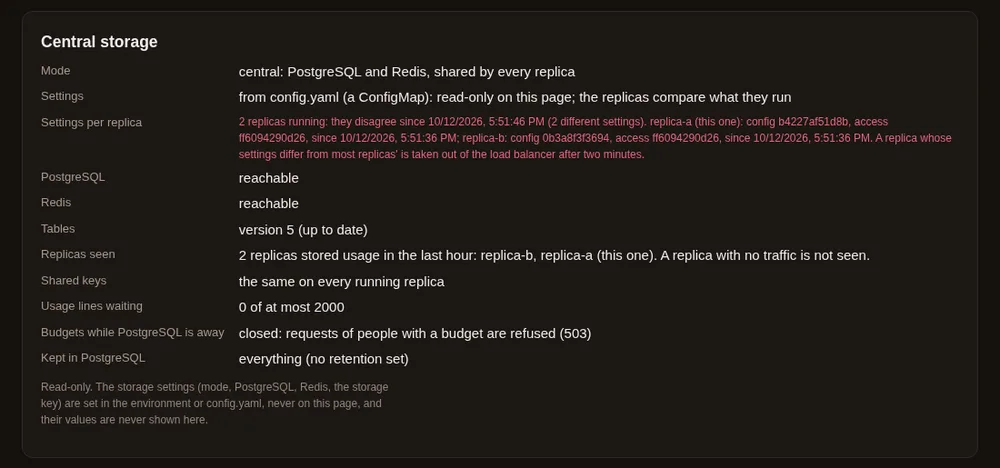
config.yaml files (with ready_requires_same_config on). A demo setup with a local PostgreSQL and a stand-in Redis.With settings in PostgreSQL this should never fire: PostgreSQL decides who is ready, and a disagreement is only reported.
Step by step: settings in PostgreSQL (config/ha-shared) #
Put your starting
config.yamlinmanifest/maple-proxy/configmap.yaml: it is copied into PostgreSQL at the first start (MAPLE_SETTINGS_SEED).Edit the Secret patch in
config/ha/kustomization.yaml(config/ha-sharedbuilds on it), then:cd config/ha-shared kustomize edit set image maple-proxy=registry.example.com/you/maple-proxy:2.2.0 kubectl apply -k . kubectl -n maple rollout status deploy/maple-proxyOpen the setup page of any replica (see On the setup page), change a setting, and check Data & storage: Settings says kept in PostgreSQL, This replica's settings says the store's current copy, and Settings per replica says every running replica runs the same settings.
Step by step: settings from the ConfigMap (config/ha) #
- Put
config.yamlinmanifest/maple-proxy/configmap.yamland the access tokens in the Secret (access.proxy_tokens). cd config/ha, set the image,kubectl apply -k ..- To change a setting, edit the ConfigMap and roll out:
kubectl -n maple rollout restart deploy/maple-proxy. - Watch Settings per replica on Data & storage, or
/healthz, during and after a rollout.
People who sign in with single sign-on, with settings from the ConfigMap. The proxy cannot write the ConfigMap,
so it cannot give people the sign_in_marker it uses elsewhere to tell a person from someone added later with the
same id. Here a person's sign-in is tied to their people[].sign_in_marker line when they have one, and otherwise to
the addresses setup_page.sso.people names them by (the address-to-person lines that let them sign in here). The
setup page's People card says so too.
- What the proxy notices by itself. You remove a person and add someone else with the same id in one edit, and
the new person's addresses in
setup_page.sso.peopleare not the old one's (or the new person has none). Within seconds of a replica reading the new file (a ConfigMap updated in place, or a rollout), the old account stops signing in as that id, what was made for the old person is cleared, and the tokens they made for themselves are revoked (Recent activity showssso.prunewithreason=identity_changed). Changing a person's team, budget, models or accounts never ends a sign-in, and neither does adding an address or removing one of several. Removing all of a person's addresses ends their sign-in, as giving the id to someone new would (put the line back and they sign in again). To replace a person's only address, add the new one first and remove the old one in a later edit, a minute or more after the first has reached every replica. Keep the tokens a person made for themselves in theirtokens:list as the exported file has them. Mount the ConfigMap as a folder, not withsubPath: a file mounted withsubPathis never updated in place, so changes reach a replica only when it restarts. - A
sign_in_markerline wins. When a person has one, only the marker counts: keep it when you edit the ConfigMap (a file exported from PostgreSQL withmaple-proxy storage export-config, or copied from a proxy that keeps its own settings, has them), and change it when you give the id to someone else. Adding a marker to someone already signed in keeps their sign-in. - When you still need to act. The proxy cannot tell two people apart when the files say the same thing about both:
the old and the new person share an address in
setup_page.sso.people(remove the old one's), neither has any address, or the id keeps the samesign_in_marker. Then change the marker, or forget the old sign-in: Forget their sign-in on the person's Access and tokens, or from a replica,kubectl -n maple exec deploy/maple-proxy -- maple-proxy people forget-signin <id>. The command changes nothing inconfig.yaml; it forgets the accounts and terminals that sign in as that id and revokes the tokens they made for themselves. - Upgrading from 2.2.0. At the first start, each sign-in is tied to the addresses the ConfigMap names its person
by. A sign-in with an address the ConfigMap no longer names for that person (an id given to someone else while
2.2.0 ran, or the line removed after the first sign-in) is cleared then, with its terminals and the tokens its
account made; put the line back and the person signs in again. A developer whose GitHub account lists another address first than
the one in
setup_page.sso.peoplemay have to sign in once more. Changingstorage.keykeeps every sign-in, and going back to 2.2.0 works as 2.2.0 did.
Move from the ConfigMap to PostgreSQL #
- Keep a copy of what runs now: the ConfigMap's
config.yaml. - Apply
config/ha-sharedinstead ofconfig/ha. With no settings in PostgreSQL yet, the first replica takes the ConfigMap's file (MAPLE_SETTINGS_SEED) and says so in its log. - If PostgreSQL already holds settings (you tried it before), copy the file in on purpose, from one replica:
kubectl -n maple cp config.yaml maple-proxy-0000000000-abcde:/tmp/config.yaml
kubectl -n maple exec maple-proxy-0000000000-abcde -- maple-proxy storage import-config --from /tmp/config.yaml
storage import-config [--from config.yaml] [--access access.json] [--force]copies the files into PostgreSQL, where every replica runs them, and prints what it did. It refuses a file that does not load, one with the storage key, a password or a provider key written into it (move keys to the secret store first:maple-proxy secrets migrate), and replacing a different copy already in PostgreSQL, or one that fails its signature check, unless you add--force. Every replica applies the import within seconds; the command waits a few seconds and checks PostgreSQL still holds what it imported.
Move from PostgreSQL back to the ConfigMap #
- Get the settings as files:
maple-proxy storage export-config --out config.yaml [--access-out access.json](inside a replica, thenkubectl cpit out). Files are written whole or not at all, readable by their owner only, and an existing file is replaced only with--force. - Put
config.yamlin the ConfigMap, the tokens in the Secret, and applyconfig/ha. The copy left in PostgreSQL is no longer read.
Provider sign-ins. A provider with an API key in the Secret (${secret:provider/<id>/api_key}) works on every
replica. A sign-in made in the browser (GitHub Copilot's device sign-in) is kept by the replica it was made on; with
several replicas, sign in on each, or prefer a key. The short-lived session token a signed-in account gives is
shared: one replica asks for it, the others use it.
Load balancing #
- Round robin is right: nothing needs sticky sessions. A conversation keeps to the provider account that last answered it on every replica (so the provider's prompt cache keeps hitting), signed-in browsers are known to every replica, and rate limits count across replicas.
- If you want them anyway, hash on the
X-Maple-Sessionheader that Maple Harness sends. - Never let the load balancer retry a POST on another replica: a model request is not safe to send twice. A
client that retries can send an
Idempotency-Keyheader: a repeat with the same key gets the same answer and is not charged again, on any replica; a repeat while the first is still running is refused with409; a streamed answer cannot be played back, so its repeat is refused with409saying so. - Keep idle and read timeouts long (streams can take minutes; the keep-alives arrive every 15 seconds).
- Behind an Ingress or a load balancer that adds
X-Forwarded-For, list its addresses inserver.trusted_proxies(orMAPLE_TRUSTED_PROXIES): the addresses of your Ingress controller's pods, and nothing wider, since anything inside a listed range can name its own client address. The balancer must add the client to the header, not pass on the one the client sent. Otherwise every request seems to come from the balancer, and one client sending wrong tokens gets every client refused with429for a minute. With it, each client is counted on its own; a header from any other address is ignored, so a client cannot choose its own address. A Service on its own (no Ingress) adds no header and needs nothing.
When PostgreSQL or Redis is away #
- PostgreSQL away: requests are still served. Requests of people with a budget are refused with
503until it is back (storage.budgets_when_down: openlets them through, uncounted). Usage lines wait in a small queue in the replica's memory (storage.spool_max_records, 2000) and are written once it is back, each once. They are lost if the replica stops before then, and the log says how many./readyzsaysnot ready. - Redis away: requests are still served. The setup page answers
503(signed-in browsers cannot be checked), rate limits refuse callers from other machines and so does the wrong-token limit for a wrong or missing token (a valid token is still served), caches miss, conversation pins and shared quota marks fall back to each replica's own, and no replica runs the jobs only one replica runs./readyzsaysnot ready. A Redis that answers as a read-only replica (an address still on the old primary after a failover) counts as away.
Use a single Redis (or one with a standby); a Redis cluster is not supported.
Keep PostgreSQL and Redis to the proxy. The settings kept in PostgreSQL (config.yaml, the access tokens and the
setup page's password) are signed with a key derived from storage.encryption_key, and every replica checks the
signature each time it reads them: a copy changed in the database by someone without that key is refused. The
replicas keep the copy they had (a row removed from the table counts as changed), put it back, write a SECURITY line to the log and record a settings.refused
event. A replica that starts while the shared copy is refused does not start until a running replica has put a good
copy back (with none running, restore the maple_documents table from a backup, or import a copy you exported with
storage import-config --force). Budgets,
usage and sessions are not signed, so still treat write access to either database as admin access to the proxy.
The samples allow only the proxy's pods (and the lake jobs) in with NetworkPolicies and give Redis a password; use
TLS (sslmode=require, rediss://) when they are outside the cluster.
Upgrades #
Roll replicas out one at a time (the sample sets maxUnavailable: 0). A new release adds to the database's tables
and never removes or renames anything that the release before still uses, so old and new replicas run side by side
during the rollout; upgrade one release at a time. A replica that stops turns not ready first, waits for endpoints
to drop it (preStop, 5 seconds; it needs Kubernetes 1.30 or later), finishes its running requests and streams
(up to terminationGracePeriodSeconds, 600 in the sample), then exits.
Backups #
Back up PostgreSQL (pg_dump, or your provider's backups): it holds the usage, events, budgets, settings and audit
log. maple-proxy storage export-config also writes the shared settings to files. Redis holds nothing that must
survive: after losing it, browsers sign in again and caches fill again (and the record of the settings' newest
versions is written again with the next change). Old usage
is deleted after server.usage_retention_days by one replica.
Usage for analysis #
The shared PostgreSQL holds every replica's usage and events as two read-only views with typed columns:
maple_usage_rows (every column of the usage record, in its order, after
_day, _ingested_at and _ingest_seq) and maple_events_rows (the events columns after _event_id, _day,
_ingested_at, _ingest_seq and _proxy_instance). Give analysts a PostgreSQL role that can only read them, and
they can query them from DuckDB directly:
INSTALL postgres; LOAD postgres;
ATTACH 'host=postgres.maple.svc dbname=maple user=analyst' AS maple (TYPE postgres, READ_ONLY);
SELECT person, sum(ai_units) AS ai_units, count(*) AS requests
FROM maple.public.maple_usage_rows
WHERE at >= now() - INTERVAL 7 DAY
GROUP BY person ORDER BY ai_units DESC;
maple-proxy usage query and usage export, run in a replica (kubectl exec), read the same data.
Keep a short window in PostgreSQL and the whole history in a lake. PostgreSQL is the live database; it keeps
storage.retention_days of usage and events (by default server.usage_retention_days, 90). For history beyond
that, manifest/maple-lake (and the overlay config/ha-lake) copies closed periods into a DuckLake every hour: its
catalog in its own schema (maple_lake) of the same PostgreSQL, its data files on a volume or in S3. The copy only
ever adds, each line once, so deleting old rows in PostgreSQL never removes anything from the lake. The jobs run the
official DuckDB image on SQL the proxy writes for you (maple-proxy usage lake --emit-sql move for the hourly job, and
--emit-sql maintain for the daily job that merges small files and removes what old snapshots no longer need);
generate it again after an upgrade. A lake keeps one source: once the move has filled it, a run that would load a
machine's daily files into it is refused (--allow-mixed-sources overrides that). For S3, give the job credentials in its Secret or, better, workload identity (IRSA, Workload Identity).
What changes the cost: how often the copy runs (more often means fresher history and more, smaller files to
merge), how long PostgreSQL keeps rows (its size), how often maintenance runs and how many old snapshots it keeps
(the lake's storage), and where the data files live (a volume, or object storage and its requests). Analysts attach
the lake read-only the same way. maple-proxy usage lake --emit-sql attach --catalog-dsn-env MAPLE_POSTGRES_DSN
--data-env MAPLE_LAKE_DATA_PATH prints what to run in duckdb, with MAPLE_POSTGRES_DSN set to a read-only
connection string for the analyst (host=postgres.maple.svc dbname=maple user=analyst, for example) and
MAPLE_LAKE_DATA_PATH to the data path. For data in S3 (s3://your-bucket/maple/) add --s3, which also loads the
httpfs and aws extensions and reads credentials from DuckDB's credential chain. Without it, the command prints:
-- Maple usage lake, read-only. Needs DuckDB with the ducklake extension (INSTALL ducklake; once),
-- the postgres extension (INSTALL postgres; once) and the catalog's connection string in $MAPLE_POSTGRES_DSN.
INSTALL ducklake;
INSTALL postgres;
LOAD ducklake;
LOAD postgres;
CREATE OR REPLACE TEMPORARY SECRET maple_lake (TYPE ducklake, METADATA_PATH getenv('MAPLE_POSTGRES_DSN'), METADATA_SCHEMA 'maple_lake', DATA_PATH getenv('MAPLE_LAKE_DATA_PATH'), METADATA_PARAMETERS MAP {'TYPE': 'postgres'});
ATTACH 'ducklake:maple_lake' AS maple_lake (READ_ONLY);
USE maple_lake;
-- For example:
--   SELECT * FROM maple.daily_spend ORDER BY day DESC LIMIT 20;
--   FROM maple_lake.snapshots();                                -- the lake's versions
--   SELECT count(*) FROM main.usage AT (VERSION => 3);          -- as it was at one of them
More in The Maple data lake.
Without PostgreSQL: storage mode redis #
In plain words. New in 2.3: several replicas can share one Redis (or Valkey) and no PostgreSQL
(storage.mode: redis). Everything central mode keeps in PostgreSQL (usage, budgets, events, the audit log, settings
and access tokens) is kept in that Redis instead, so you run one database fewer. It is supported, but PostgreSQL and
Redis together stay the recommendation for several replicas, because:
- Redis keeps data only as well as its own settings make it: it must write an append-only file to a persistent disk and must never delete keys when it is full. PostgreSQL does this by design.
- SQL over the shared usage (
usage schema --source postgres, the read-only views analysts query) and the hourly copy into a lake need PostgreSQL. In storage mode redis,maple-proxy usage queryandusage exportread the whole proxy's usage (from a copy of what Redis holds), and that is all.
Choose it when running PostgreSQL is the harder part for you, and you can give Redis a disk and backups.
What Redis must do. The proxy checks it, and refuses a Redis that does not:
| Redis setting | Why |
|---|---|
appendonly yes (with appendfsync everysec) | What Redis holds survives a restart; at most about a second of writes is lost on a crash |
maxmemory-policy noeviction | A full Redis refuses new writes instead of deleting usage, budgets or settings. Give it room (maxmemory) and watch its memory |
| A persistent volume for its data folder | The append-only file outlives the pod |
Backups of that folder (its appendonlydir) | The only copy of your usage and settings |
The proxy reads these with INFO (never CONFIG, which managed services often refuse), at start and every 30
seconds. A managed Redis that offers no append-only file cannot be used for this mode: use central mode.
Set it up. config/ha-redis runs three replicas and the sample manifest/redis-durable (a StatefulSet with an
append-only file, noeviction and a PersistentVolumeClaim; for trying it out, not a production Redis). The replicas
run as a StatefulSet too, so each keeps its data folder on a volume of its own (see below why that matters):
cd config/ha-redis
kustomize edit set image maple-proxy=registry.example.com/you/maple-proxy:2.3.1
# the Secret patch: storage.redis_url (redis://maple:password@redis:6379/0, or rediss:// for TLS) and storage.key
# manifest/redis-durable/service.yaml: the same Redis password
kubectl apply -k .
kubectl -n maple rollout status statefulset/maple-proxy
Who can write Redis controls the proxy. In this mode Redis holds the budgets and the usage: whoever can write it
can empty a budget's count or fill it, and can stop the replicas. Settings and access tokens stay safe (they are signed
and encrypted with the storage key, so a copy written without it is refused), but treat the Redis password like an
admin password. The sample's Redis lets the proxy sign in only as a user that cannot run FLUSHALL, CONFIG,
DEBUG, SHUTDOWN or any other dangerous command (INFO stays allowed: the proxy needs it), turns the default user
off, and allows only the proxy's pods in. With your own Redis, do the same:
user default off
user maple on >PASSWORD ~* &* +@all -@dangerous +info
and use rediss:// when Redis is outside the cluster.
Each replica's start line says storage=redis, and Data & storage on the setup page shows Durability: the
append-only file and noeviction confirmed, when last checked, and since when the data is kept. Settings work as in
central mode with settings kept in the shared store: the ConfigMap is copied into Redis once
(MAPLE_SETTINGS_SEED), then changed on any replica's page; storage.settings: file (read-only on the page) works
too. storage import-config, export-config and the audit log work against Redis.
When it refuses, and how to fix it. These lines are in the replica's log; the pod restarts until it is fixed.
| Message | Fix |
|---|---|
Redis keeps no append-only file (appendonly is no) | Start Redis with --appendonly yes (or CONFIG SET appendonly yes and keep it in its config file) |
Redis may delete keys when it is full (maxmemory-policy is ...) | Set maxmemory-policy noeviction |
Redis could not write its append-only file | Its disk is full or read-only: fix the volume |
Redis answers as a read-only replica (role slave), not the primary | storage.redis_url names a replica: use the primary's address (with a managed Redis, its primary endpoint). After a failover, check that the address moved to the new primary |
Redis did not answer INFO persistence | The Redis user may not run INFO: allow it (+info). Without it, the proxy cannot check |
the proxy cannot confirm that Redis keeps data durably (while running) | INFO failed three checks in a row from a Redis that answers: allow INFO again |
storage.mode redis keeps everything in Redis, but storage.postgres_dsn ... is set | Remove postgres_dsn, or use storage.mode: central |
the data this replica ran on is gone from Redis | Redis lost its data (a restart without its append-only file, FLUSHALL, another Redis). Restore it from a backup. To start on the empty Redis anyway, delete the file the message names and start again |
While it runs (technical). Every replica checks Redis every 30 seconds. If Redis stops writing its append-only
file or starts evicting, every replica says not ready on /readyz, Data & storage says why, and nothing more is
counted into Redis: requests of people with a budget are refused with 503 (or let through, uncounted, with
storage.budgets_when_down: open), and usage lines wait in each replica's memory (storage.spool_max_records) until
it is fixed. If Redis loses its data (a restart without its append-only file, FLUSHALL, another Redis), every write
notices it at once, not at the next check: nothing is written into the emptied Redis, and the replicas stay not ready
until they are restarted. A replica restarted with its data folder remembers the store it ran on and does not start on
an emptied Redis, so nothing is counted from zero by mistake; a replica whose folder is new cannot know, starts, and
says so in its log. That is why config/ha-redis gives each replica a volume of its own.
- Redis away: as in central mode for both stores at once: requests are served, budgets follow
budgets_when_down, usage lines wait in memory, the setup page answers503,/readyzsaysnot ready. - Failover to a standby: when the standby is promoted and the address moves to it, the replicas go on where they were: the same usage, the same budgets. While the address still reaches a server that is now a read-only replica, that counts as Redis away (above), and Data & storage says so; usage lines wait and are written once the address is right. Redis copies writes to its standby a moment after it answers them, so when the primary itself fails, the last moment of counts may not have reached the standby and can be missing after the failover. A standby promoted before it had a copy of the data at all is caught as lost data (the replicas say the data in Redis is gone; the fix is in the table above): nothing is counted from zero.
- Settings: signed as in central mode and also encrypted with the storage key in Redis, so whoever can write Redis without the key cannot add a token or change a setting: the replicas refuse the copy and put theirs back. Each replica also remembers, in its own data folder, the newest version of each shared document it accepted (the settings, the access tokens, the setup page's password), and refuses an older copy put back later, also after a restart. A replica whose folder is new has that memory from its first read on.
- Retention: one replica deletes usage, events, audit entries and what child hubs sent up, older than
storage.retention_days(by defaultserver.usage_retention_days, 90). Redis keeps it all in memory: sizemaxmemoryfor that many days. With no retention (0) every line stays in Redis's memory, and the log says so. - Backups: back up Redis's data folder;
maple-proxy storage export-configalso writes the shared settings to files. - A Redis cluster is not supported (one Redis, or one with a standby).
The MCP hub #
The hub's servers are programs and sessions that live on one machine, so the hub runs as one replica of its own
(manifest/maple-mcp-hub, started with maple-proxy mcp-hub serve), with its own ConfigMap; clients connect to its
Service. The proxy replicas do not serve it. It has a Secret of its own: never mount the proxy's in its pod, since the
hub runs other programs. Off the pod's loopback address the hub needs TLS, or insecure_http
behind an Ingress that terminates TLS, and an mcp-hub token.
Run MCP servers as containers of their own. A stdio server is a program the hub starts. On a machine the hub
starts it inside a sandbox; the container image has no sandbox (it would need user namespaces, which
most clusters do not give a pod), so there the hub refuses to start a stdio server and says why. Instead, run each
server as its own container that serves MCP over HTTP, and add it to the hub by URL (type: http):
- As a sidecar in the hub's pod (
manifest/maple-mcp-hub/sidecar.example.yaml): the server listens on the pod's loopback address and the hub reaches it athttp://127.0.0.1:<port>/mcpwithallow_private: true. It has its own image, user and limits, and the hub's Secret is not mounted in it. It shares the pod's network. - As its own Deployment and Service for a server you trust less, with a NetworkPolicy that lets only the hub in;
add it with the Service's URL and
allow_private(andallow_insecure, or give it TLS).
mcp_hub.allow_uncontained_stdio: true starts stdio servers in the container anyway, without containment: such a
program can read everything the hub's container can, its mounted Secret included, and reach the network. Use it only
for programs you would trust with that Secret.
Its tokens come from that Secret: access.mcp_hub_tokens, one label=token per line (make each token with
openssl rand -hex 24), the same way the proxy's tokens come from access.proxy_tokens. They get the mcp-hub
scope only, and only in the hub's pod. To revoke one, take its line out of the Secret: the hub applies the change
within a minute, without a restart, and removing every line (or the key) revokes them all. An example value left in
place is refused, so the hub does not start with a token anyone could read. Refused requests go to the hub's audit
log, as the proxy's do.
Reaching cloud metadata or link-local services #
The hub never connects an MCP server to a link-local address (169.254.0.0/16, fe80::/10) or a cloud metadata
address (such as 169.254.169.254 or fd00:ec2::254), also in the standard IPv6 forms that carry such an address,
and allow_private does not change that: on a node, the metadata address hands out the node's or the pod's cloud credentials to
whatever asks, and a server address that ends up there (a typo, a changed DNS record) would let an MCP connection
read them.
If a server you trust really lives at one of these addresses, list the exact addresses, each with a port if you
like, in MAPLE_MCP_ALLOW_ADDRESSES on the hub's container. It is read only from the environment, never from the
ConfigMap, the Secret or the setup page, so it changes only with the Deployment itself:
# manifest/maple-mcp-hub/deployments.yaml
spec:
  template:
    spec:
      containers:
        - name: maple-mcp-hub
          env:
            - name: MAPLE_MCP_ALLOW_ADDRESSES
              value: "169.254.170.2:80"   # exact addresses only: no names, ranges or wildcards
A bad value stops the hub from starting, with a message in its log. When set, the hub logs a warning with the
addresses at start, maple-proxy mcp-hub status shows them, and the first connection by each server to each is written to the
audit log. An allowed address in a private range (such as fd00:ec2::254) also needs allow_private on the server. Whatever answers at an allowed address can be reached by every server that resolves there, so allow as
few as you can. More in MCP hub.
Logs #
kubectl -n maple logs deploy/maple-proxy -f
kubectl -n maple logs -l app.kubernetes.io/name=maple-proxy --prefix
Logs are JSON on standard output, one object per line, with proxy_instance naming the pod; see
Docker: Logs for the fields, levels and shipping. Probes are left out of the request log.
Metrics #
Each pod can serve its own Prometheus /metrics (off by default): set metrics: {prometheus: "on"} in the
ConfigMap, add a metrics token to the Secret (access.metrics_tokens, one label=token a line), and add the
config/metrics component to your overlay. It adds a ServiceMonitor (Prometheus Operator) that scrapes every pod
on the OpenAI-compatible port with that token; add the replicas up in Prometheus. The token reads /metrics and
nothing else. OpenTelemetry export (otel.endpoint) and audit lines for a SIEM (log.audit_lines) are set the
same way; see Metrics and telemetry export.
The setup page's Monitoring tab writes these for you to copy: step 3, Scrape it, has a Kubernetes Secret and
ServiceMonitor for the Prometheus Operator, a Prometheus scrape_configs entry and a curl line, with the token as
a placeholder. With settings from the ConfigMap, the tab's switches are read-only: set the keys in the ConfigMap.
Images and memory #
The pod's memory limit sets how much image resizing may take at once (25% of it by default) and Go's own memory limit
(90% of it); see Docker: Images and memory. Raise limits.memory, or
images.resize_memory, if your tools send many large screenshots at once.
Search by meaning #
Each replica downloads a model on first use into its own folder (an emptyDir in config/ha). To download once for
all, mount one ReadWriteMany volume at /models in every replica: replicas installing the same model at the same
moment wait for one another, and each download is checked against its pinned checksums before it is moved into
place.
Read next: Docker, Teams, Security, Proxy settings.